

🔥 3D Printer Black Friday Deals: picks worth watching →
You have a Creality printer, and you are ready to produce high-quality parts. But every print seems to have stringing, poor adhesion, or layer shifts. The secret is not just the machine; it is mastering the best Creality print settings for your specific model and filament. This guide breaks down the essential parameters and highlights the hardware and materials that make tuning easier. We cover everything from multicolor printing with the K2 Combo to choosing the right PLA filament. Whether you are a beginner or a seasoned maker, these insights will save you time and filament. For a deeper dive into slicer profiles, check out our Best Creality Slicer Settings for K2 Series Nozzle Upgrades in 2026.
What will your print cost? Use our filament cost calculator.
Product Comparison


Buying Guide
Print Speed and Acceleration
Your print speed directly affects both quality and time. The Creality K2 Combo (A) 3D Printer boasts a blazing 600 mm/s speed, but you may not always want to run at maximum. For detailed models, reducing speed to 50-80 mm/s improves layer adhesion and reduces ringing. The key is to match the speed to the filament type and model geometry. Faster speeds require a sturdy frame and precise motion system, which the K2 delivers with its step-servo motors.
Acceleration and jerk settings also matter. Lower acceleration values (around 500 mm/s²) minimize vibrations and ghosting. For functional parts where speed is critical, you can increase acceleration, but always perform a calibration cube first. Compare different printer capabilities in our creality vs elegoo article for more context.
Filament Selection and Temperature
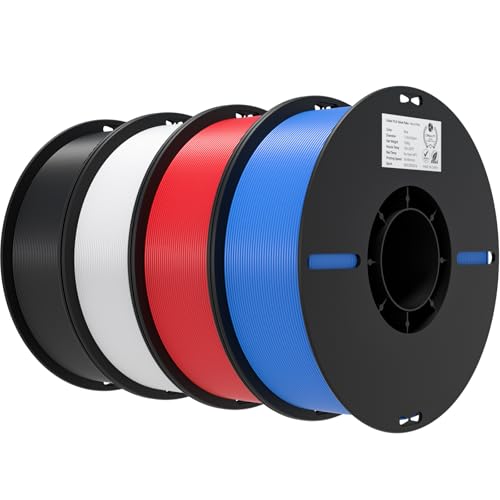
Different filaments require distinct temperature and cooling settings. PLA, the most common material, prints well at 190-220°C with a bed temperature of 50-60°C. The Creality PLA+ 3D Printer Filament 1.75mm is a great choice because it offers enhanced toughness and a wider temperature range. For PLA+, we recommend starting at 205°C and adjusting up or down by 5°C increments. Always dry your filament before use; moisture causes bubbles and poor layer adhesion. The Creality PLA+ filament comes vacuum-sealed with desiccant, ensuring optimal dryness.
If you use multicolor printing with the K2 Combo and its CFS unit, the filament path is longer, so you may need to increase the nozzle temperature by 5-10°C to compensate for cooling. For materials like PETG or ABS, consult the manufacturer’s guidelines and use an enclosure if possible. For more on slicer settings, see our guide on Best Elegoo Slicer Settings for Neptune 4 Plus in 2026, which shares principles applicable to Creality printers.
Layer Height and Resolution
Layer height determines the print’s surface finish and detail level. For most Creality printers, a layer height of 0.2 mm is a good balance of speed and quality. For high-detail miniatures or models with fine features, use 0.12 mm or even 0.08 mm. The trade-off is print time; a 0.12 mm layer height doubles the time compared to 0.2 mm. For functional parts where strength is more important than appearance, 0.28 mm is acceptable. The K2 Combo’s build volume of 260×260×260 mm allows you to print larger objects without sacrificing detail.
First layer height is critical: set it to 0.2 mm for most prints and use a slow first layer speed (20 mm/s) to ensure adhesion. The K2’s smart auto-leveling probes only the print area, making first layer calibration faster and more precise. For beginners, we recommend starting with the Creality 3D Printer Tool Kit to have all the tools for bed leveling and nozzle cleaning on hand.
Cooling and Retraction
Proper cooling prevents stringing and improves overhang quality. For PLA, use 100% fan speed after the first few layers. For PETG, reduce fan speed to 30-50% to avoid warping. The K2’s dynamically balanced fans operate quietly, so you can run the printer in a living space without distraction. Retraction settings also combat stringing. For direct-drive extruders like the K2’s, a retraction distance of 0.5-1.0 mm at 25-40 mm/s is typical. For Bowden setups, longer retractions (4-6 mm) are needed. The K2’s step-servo motors adjust torque dynamically, ensuring consistent extrusion during retractions.
If you experience stringing, first reduce the nozzle temperature by 5°C, then adjust retraction. For multicolor prints with the K2 and CFS, retraction settings may need fine-tuning to avoid color bleeding. The AI camera on the K2 can detect spaghetti failures in real time, saving you from failed prints. For more on printer categories, visit our Fdm 3d Printers page.
Final Thoughts
Mastering the best Creality print settings is a journey of calibration and experimentation. For users who want cutting-edge multicolor capability and speed, the Creality K2 Combo (A) 3D Printer stands out with its 16-color CFS system, smart auto-leveling, and quiet operation. For those focused on reliability and value, the Creality PLA+ 3D Printer Filament 1.75mm delivers consistent quality with excellent toughness. Pair a great printer with quality filament, and you will achieve stunning results every time. Explore our broader 3d Printers category for more options and visit the Beginner 3d Printers section if you are just starting out.
Frequently Asked Questions
What are the best Creality print settings for PLA in 2026?
For standard PLA, set the nozzle temperature to 200-210°C, bed temperature to 60°C, layer height to 0.2 mm, and print speed to 50-60 mm/s. Enable retraction of 0.5 mm at 25 mm/s for direct-drive extruders. For the Creality K2 Combo, use its smart auto-leveling to ensure a perfect first layer.
How do I fix stringing on my Creality printer?
Stringing is usually caused by high nozzle temperature or insufficient retraction. Lower the nozzle temperature by 5-10°C and increase retraction distance by 0.2 mm increments. Ensure your filament is dry; use the Creality PLA+ filament which is vacuum-sealed to prevent moisture. Clean the nozzle with the needle from the Creality 3D Printer Tool Kit.
What layer height should I use for functional parts?
For functional parts that require strength, use a layer height of 0.28 mm. This reduces print time while maintaining good layer adhesion. For parts with fine details, use 0.12 mm. The Creality K2 Combo’s sturdy frame ensures consistent quality at various layer heights.
Do I need to use an enclosure for PLA with Creality printers?
Not typically; PLA prints well without an enclosure. However, if your room is drafty or below 20°C, an enclosure can prevent warping. For materials like ABS, an enclosure is essential. The Creality K2 Combo supports a wide range of materials, including PLA-CF, which may benefit from stable ambient temperatures.


