

🔥 3D Printer Black Friday Deals: picks worth watching →
If you are torn between xTool and Creality for your next laser engraver or filament dryer, you are not alone. Both brands offer powerful tools that can transform your creative workflow, but they serve slightly different needs. In this xTool vs Creality guide, we evaluate five products that highlight each brand’s strengths, from xTool’s innovative rotary attachments to Creality’s advanced filament dryers and multi-color 3D printers. Whether you are a hobbyist looking to engrave tumblers or a professional seeking efficient drying solutions, this comparison will help you decide.


What will your print cost? Use our filament cost calculator.
Buying Guide
Engraving Versatility
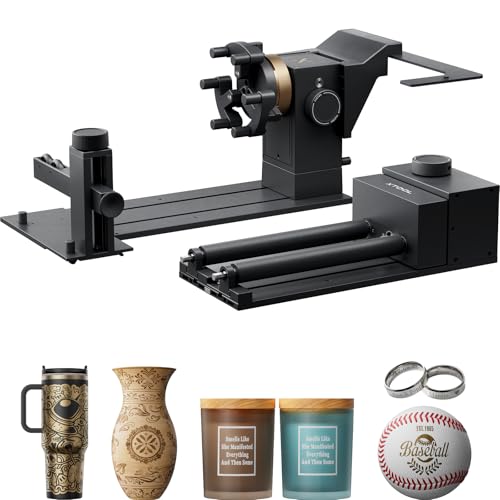
When choosing between xTool and Creality for laser engraving, consider the range of materials and objects you plan to work with. xTool excels with its RA3 rotary attachment, which allows you to engrave on curved surfaces like tumblers, vases, and rings without manual adjustments. Creality’s laser engravers, like the Falcon2 Pro, are robust for flat materials but lack this specialized rotary system. If your projects involve cylindrical items, xTool’s smart rotary is a game-changer.
Filament Drying Efficiency
For 3D printing enthusiasts, filament moisture can ruin prints. Creality offers two dryers: the Space Pi X4L with dual chambers and high-temperature drying for advanced filaments, and the Space Pi SE for single spools. xTool does not produce dryers, so if drying is a priority, Creality is the clear choice. The X4L’s rapid drying and storage capabilities ensure your filament stays print-ready.
Multi-Color Printing
Creality’s SPARKX i7 Nano Combo brings multi-color printing to a compact desktop size, with auto feed and retract features that simplify the process. xTool focuses on laser engraving, not 3D printing, so if you want vibrant multi-color models, Creality is your best bet. This printer is ideal for beginners and educators.
Portability and Setup
xTool’s F2 dual laser engraver, paired with the Smoke Purifier Go, offers a portable solution for on-the-go creators. It combines IR and diode lasers for versatility. Creality’s products, while powerful, are more stationary. If you need a mobile engraving setup, xTool provides a compact package. For more on portable engravers, check out our best desktop laser engraving machine guide.
Final Thoughts
In the xTool vs Creality matchup, your choice depends on your primary needs. For advanced laser engraving on curved objects and a portable dual-laser system, opt for the xTool RA3 World’s First Smart MagSwap Rotary or the xTool F2 + Smoke Purifier Go. If you prioritize filament drying and multi-color 3D printing, the Creality Filament Dryer Box 4 Spools and Creality SPARKX i7 Nano Combo Multi‑Color 3D are excellent investments. Both brands deliver quality, but matching the tool to your project ensures the best results.
Frequently Asked Questions
Can I use xTool rotary attachments with Creality laser engravers?
No, xTool’s RA3 rotary is designed exclusively for the xTool P2 and P2S series. Creality laser engravers have their own rotary systems. If you own a Creality machine, look for compatible rotary attachments from Creality or third-party brands.
Which brand offers better filament dryers for 3D printing?
Creality dominates this category with models like the Space Pi X4L and Space Pi SE. xTool does not manufacture filament dryers. For drying PLA, PETG, and advanced filaments, Creality’s dryers with precise temperature control and rapid drying are top choices in 2026.
Is xTool F2 worth the investment for a beginner?
The xTool F2 is a dual-laser engraver that suits both beginners and pros due to its portability and ease of use. It includes a smoke purifier, making it safe for indoor use. However, its price point is higher than entry-level diode lasers. For a more budget-friendly start, consider the creality Falcon2 pro 22W review for a powerful alternative.
Can the Creality SPARKX i7 print in multiple colors automatically?
Yes, the SPARKX i7 Nano Combo features auto feed and retract for multi-color printing. It can switch filaments automatically, and with auto refill, it can continue long prints without manual intervention. This makes it ideal for complex, colorful projects.




