

🔥 Laser Engraver Black Friday Deals for 2026: picks worth watching →
You have a stack of aluminum business cards waiting for a personal touch, but your current engraving setup cannot handle metal. The best laser engraver for aluminum solves this problem by delivering crisp, permanent marks on coated surfaces without breaking the bank. Whether you are a hobbyist upgrading from a basic model or a small business owner scaling up production, this guide covers the top diode laser engravers that excel on aluminum and other materials. For more context on diode technology, see our creality Falcon2 pro 60W review.


Buying Guide
Laser Power and Wavelength
For aluminum engraving, diode lasers with 5W to 10W output are ideal. Higher wattage cuts faster and deeper into coated metals like anodized aluminum. The Twotrees TTS-10 Pro offers 10W for aggressive engraving, while the ELIDOR 6000mW provides a balanced 6W for fine detail. Always check if the laser can mark bare metal or requires a coating spray. Our best hobby CO2 laser explains similar considerations for CO2 systems.
Work Area and Portability
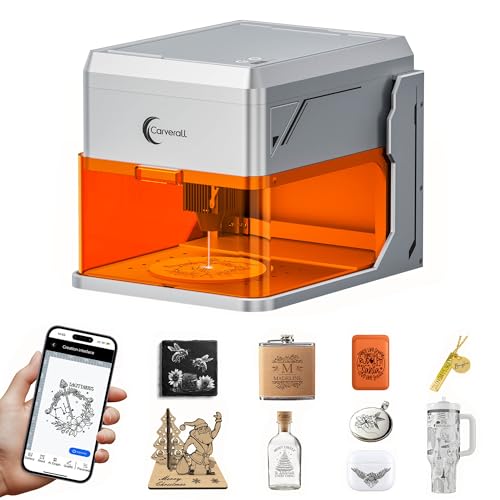
A compact work area suits small items like business cards and keychains. The Carverall A1 Pro offers a 3.94×3.94-inch area, perfect for jewelry blanks. The ELIDOR Z6 provides an 11.8×11.8-inch bed for larger projects. If you need to engrave on furniture or walls, the Carverall’s removable base adds flexibility. For portable options, check our affordable fiber laser engraver page.
Software Compatibility and Ease of Use
Top engravers support LaserGRBL and LightBurn for cross-platform design. The Carverall A1 Pro includes free CutLabX software with AI design features. The Twotrees TTS-10 Pro works offline via TF card, ideal for production runs. Beginners appreciate the ELIDOR Z6’s plug-and-play setup. For more beginner-friendly picks, see our top rated laser engraver.
Safety and Build Quality
Enclosed designs with Class 1 safety are essential for home use. The Carverall A1 Pro stops the laser when opened and auto-shuts if tilted. Metal frames reduce vibration for consistent engraving. The Twotrees TTS-10 Pro uses aluminum alloy construction. For safety comparisons, read our ACMER S2 review.
Final Thoughts
Choosing the best laser engraver for aluminum depends on your project scale and skill level. For beginners who want a safe, enclosed machine with intuitive software, the Carverall A1 Pro 5W Desktop Laser Engraver offers exceptional value with AI design tools and a compact footprint. If you need higher power for production work on anodized aluminum, the Twotrees TTS-10 Pro Laser Engraver,10000mW delivers deep engraving at a competitive price. Both models handle coated metals reliably, ensuring your custom business cards, tags, and gifts look professional every time.
Frequently Asked Questions
Can a diode laser engrave bare aluminum?
Diode lasers typically need a coated or anodized surface to mark aluminum. For bare metal, use a marking spray or choose a fiber laser. The Twotrees TTS-10 Pro works on coated aluminum but not on bare stainless steel without preparation.
What is the best wattage for engraving aluminum in 2026?
For hobbyists, 5W to 6W models like the ELIDOR Z6 provide fine detail on coated aluminum. For faster production, 10W lasers like the Twotrees TTS-10 Pro reduce pass time. Always verify compatibility with your specific aluminum type.
Do I need special software to engrave aluminum?
Most diode engravers work with free software like LaserGRBL or LightBurn. The Carverall A1 Pro includes CutLabX with AI features. No additional purchase is required for basic designs. For more tips, see our best laser engraver for bamboo.
How long does it take to engrave an aluminum business card?
With a 6W laser, a simple text design takes about 2-4 minutes per card. The weparmeety 100 Pcs Metal Business Cards Aluminum blanks are pre-sized for standard wallets and work well with all reviewed engravers.





