🔥 3D Printer Black Friday Deals: picks worth watching →
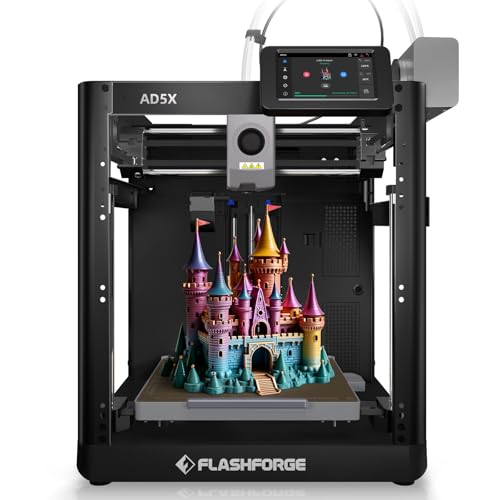
You have a brilliant design for a flexible part, a TPU phone case, or a custom gasket, but your current printer keeps jamming or producing stringy messes. Flexible materials like TPU are notoriously tricky to print, requiring the right extruder, temperature control, and motion system. This guide is for hobbyists and professionals who want a reliable machine that handles flexible filaments without constant frustration. We have evaluated the top contenders to help you find the best 3D printer for flexible material for your needs. For more on multicolor options, check our Flashforge AD5X multicolor review.


What will your print cost? Use our filament cost calculator.
Buying Guide: What to Look For
Direct Drive Extruder
Flexible filaments like TPU are soft and can buckle in a Bowden tube setup. A direct drive extruder, where the motor is mounted directly on the print head, provides the short, stiff path needed for reliable feeding. All the printers in this roundup feature direct drive or equivalent toolhead systems, ensuring you get consistent extrusion.
For example, the creality K2 plus extruder review highlights how a well-designed direct drive can handle flexible materials with ease. Look for a printer that offers a hardened steel nozzle if you plan to use abrasive flexible composites like carbon-fiber reinforced TPU.
Multi-Material Capabilities
Printing with flexible materials often requires a support structure, and using a water-soluble support like PVA can save you hours of manual removal. Multi-toolhead printers allow you to print with both flexible and rigid materials in a single job, enabling complex functional parts. Consider whether you need true multi-material printing or if a single extruder with manual filament changes is enough for your projects.
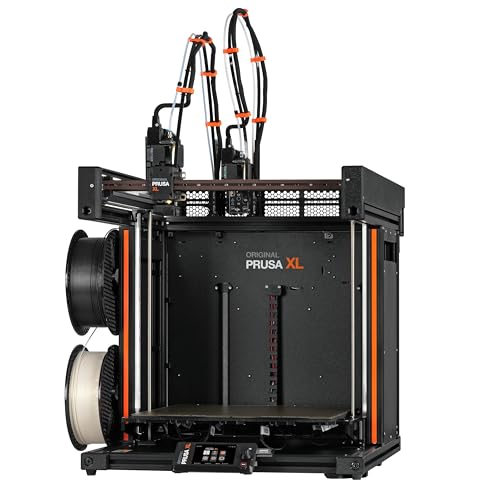
For a deep dive into a high-end multi-material option, read our Original Prusa XL review to see how its toolhead system handles flexible and engineering materials.
Build Volume and Speed
If you plan to print large flexible parts, such as custom cushions or protective covers, a larger build volume is essential. The Snapmaker U1 offers a generous 270 x 270 x 270 mm, while the Flashforge Creator 5 provides 256 x 256 x 256 mm. Speed also matters, especially if you are producing multiple iterations. CoreXY printers like the Flashforge AD5X can reach 600 mm/s, but remember that flexible materials often require slower speeds for best quality.
Compare these specs with other models in our creality K2 pro vs bambu P2S comparison to see how they stack up.
Heated Chamber and Bed
Flexible materials like TPU do not require a heated chamber, but engineering-grade flexibles and composites benefit from one. The Flashforge Creator 5 Pro offers an actively heated chamber up to 65°C, which helps prevent warping and improves layer adhesion for materials like PA-CF. A heated bed is standard on all modern printers, but look for one that supports flexible build plates for easy removal.
For more on chamber heating benefits, see our bambu lab black friday deals article for deals on printers with advanced environmental controls.
Final Thoughts
Choosing the right printer for flexible materials comes down to your specific needs: if you prioritize speed and multi-color flexibility, the FLASHFORGE AD5X Multi-Color & Material 3D Printer is an excellent value, while the Snapmaker U1 3D Printer,4-Toolhead with 5s offers near-zero waste and true multi-material printing for professionals. Both handle TPU and other flexible filaments with ease, so you can start creating flexible parts with confidence.
Frequently Asked Questions
Can any 3D printer print flexible materials?
Most FDM printers can print flexible materials like TPU, but success depends on the extruder type. Direct drive extruders are preferred because they provide better control over soft filaments. Bowden setups can work with softer TPU but may require slower speeds and careful tuning.
What is the best filament for flexible prints?
TPU (thermoplastic polyurethane) is the most common flexible filament, available in various Shore hardness ratings. NinjaFlex is a popular brand for high flexibility, while TPU 95A offers a balance of flexibility and ease of printing. For more demanding applications, consider flexible composites like PETG-CF.
Do I need a heated bed for TPU?
While TPU can print on an unheated bed, a heated bed set to around 40-50°C improves adhesion and reduces warping. Most modern printers include a heated bed, so this is rarely a limiting factor. Use a build surface like PEI or a flexible magnetic sheet for easy removal.
How fast can I print with flexible materials?
Flexible materials generally require slower speeds, typically 20-30 mm/s for high flexibility, though some printers can handle 50 mm/s with proper tuning. The Flashforge Creator 5’s high-flow hotend can handle faster speeds even with TPU, but always start slow and increase gradually to avoid jams.
For more tips on printing flexible materials, check our FDM 3D printers guide.