

🔥 3D Printer Black Friday Deals: picks worth watching →
Running a small business means every order needs to be perfect, on time, and profitable. Whether you are crafting custom signs, engraving tumblers, or producing intricate acrylic pieces, the right equipment can make or break your workflow. That is why finding the best CO2 laser cutter for small business is a game-changing decision. In this guide, we evaluate eight top contenders, from compact desktop models to heavy-duty industrial units, to help you match the machine to your specific production needs.
We focus on what actually matters for a growing operation: cutting speed, material versatility, software compatibility, and safety features. You will also find a detailed buying guide and answers to common questions. If you are just starting your search, check out our broader guide to the best laser cutter for small business for additional context. Now, let us dive into the top CO2 laser cutters of 2026.




Buying Guide for a Small Business CO2 Laser Cutter
Choosing the right CO2 laser cutter for your business is not just about power. You need a machine that delivers consistent results, handles a variety of materials, and fits your workflow. Here are the key factors we recommend evaluating before you invest.
Power and Cutting Capability
The laser power, measured in watts, determines how thick and how fast you can cut. For a small business, a 40W to 60W machine is often a sweet spot, offering a balance of speed and affordability. For example, the xTool P2S 55W CO2 Laser Cutter cuts through 20mm acrylic in a single pass, which is ideal for high-volume production. If you primarily work with thin materials like leather or paper, a lower wattage may suffice, but investing in more power gives you flexibility to take on larger orders.
Higher power also translates to faster engraving speeds. The VEVOR 100W model reaches speeds up to 19.7 inches per second, which can dramatically reduce turnaround times for bulk orders. However, remember that higher power often means a larger footprint and a higher initial investment. Weigh your typical project thickness against your budget to find the right balance.
Work Area and Pass-Through Capability
The size of the work bed dictates the maximum dimensions of the materials you can process. A compact machine like the OMTech K40+ offers a 12″ x 8″ area, which is sufficient for small items like keychains and nameplates. But if you plan to create larger signs or engrave long wooden planks, you need a machine with a bigger bed or a pass-through slot. The VEVOR 80W and 100W models feature front and back pass-through doors, allowing you to work on materials much longer than the bed itself.
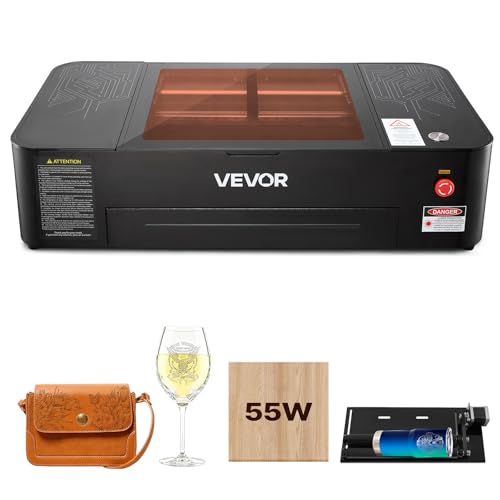
For businesses that handle a mix of small and large items, consider a model with a rotary attachment. The VEVOR 55W includes a rotary axis, enabling you to engrave tumblers, mugs, and other cylindrical objects. This versatility can open up new product lines and increase your revenue potential. Check out our review of the xTool P2 Riser Base to see how you can expand the working height of your laser.
Software Compatibility and Ease of Use
Your laser cutter should work seamlessly with the design software you already use. Most modern machines support LightBurn, which is the industry standard for laser control. The xTool P2S and VEVOR models are fully compatible with LightBurn, CorelDRAW, and AutoCAD, giving you flexibility in your design workflow. Some machines, like the ATOMSTACK A20 Pro, also offer their own mobile apps for quick jobs.
Ease of use is also critical, especially if you have employees who are not technical. Features like auto-focus, a built-in camera for positioning, and one-click start can save hours of setup time. The VEVOR 55W, for instance, has a 5MP camera and auto-focus, making it simple to align your designs perfectly. For a deep dive into the xTool P2S’s software capabilities, read our full xTool P2S 55W review.
Safety and Ventilation
CO2 lasers produce fumes and smoke that must be properly ventilated. Look for machines with an enclosed design and a built-in exhaust fan. The OMTech K40+ has a high-powered exhaust fan and a flame-retardant acrylic panel, while the xTool P2S features AI fire detection and an emergency stop. These safety features protect your employees and your workspace.
Air assist is another essential feature. It blows a stream of air over the cutting area to clear smoke and debris, resulting in cleaner cuts and reducing the risk of fire. The VEVOR models come with a 2-way pass air assist, which is particularly effective for thick materials. Always ensure your workshop has adequate ventilation, and consider a dedicated exhaust system if you plan to run the laser for extended periods.
Final Thoughts
Choosing the best CO2 laser cutter for small business ultimately comes down to your specific production needs and budget. For a versatile, high-performance desktop option that excels at both cutting and engraving, the xTool P2S 55W CO2 Laser Cutter is an outstanding choice, offering a large work area, smart features, and excellent software integration. If you need a more affordable entry point without compromising on power, the OMTech K40+ 45W Desktop CO2 Laser Engraver delivers solid performance for small-scale production, with a compact footprint and reliable safety features. Both machines are proven in small business environments, so you can confidently invest in either to boost your productivity and creativity.
Frequently Asked Questions
What is the best CO2 laser cutter for a small business?
The best CO2 laser cutter for a small business depends on your budget and the materials you work with. For most small businesses, a 40W to 60W machine like the OMTech K40+ or the xTool P2S offers a great balance of power and affordability. These models are reliable, easy to use, and compatible with popular software.
How much power do I need for a small business laser cutter?
For cutting materials up to 10mm thick, a 40W to 50W laser is sufficient. If you plan to cut thicker acrylic or wood regularly, consider a 55W or higher. Higher wattage also speeds up engraving, which is beneficial for high-volume orders. In 2026, models like the VEVOR 55W and xTool P2S provide excellent power for most small business applications.
Can a CO2 laser cutter engrave metal?
CO2 lasers cannot engrave bare metal directly, but they can mark coated metals, such as anodized aluminum or painted stainless steel. For bare metal engraving, you would need a fiber laser. The VEVOR 55W, for example, is designed for non-metal materials and coated metals only. If you need to engrave bare metal, consider a fiber laser, which is a different type of machine.
What software do I need for a CO2 laser cutter?
Most CO2 laser cutters are compatible with LightBurn, which is the most popular and user-friendly software. Some also work with LaserGRBL, CorelDRAW, and AutoCAD. The xTool P2S and VEVOR models support multiple software options, giving you flexibility. For beginners, LightBurn offers a free trial and extensive tutorials, making it a great starting point.
If you are on a tight budget, you might also explore inexpensive laser engraver options that still offer good value for small business use.
For more in-depth comparisons, check our best CO2 laser cutter and engraver.


