🔥 3D Printer Black Friday Deals: picks worth watching →
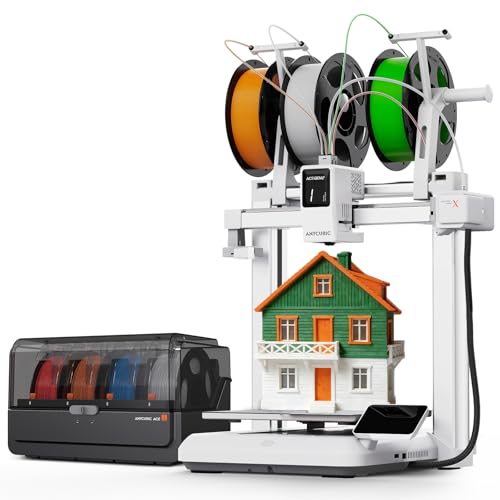
You have a small desk, a big imagination, and a desire to print in multiple colors without the usual hassle. The Creality SPARKX i7 Nano Combo promises to deliver that experience, and this Creality Cloud review will help you decide if it is the right fit for your workspace. We focus on beginners and makers who want a compact, quiet, and smart printer that integrates seamlessly with the Creality Cloud ecosystem.
Multi-color printing used to require complex setups and constant babysitting. The SPARKX i7 Nano Combo aims to change that with auto feed and retract, auto refill, and a built-in AI camera. Before we dive into the details, check out our comparison of creality vs bambu for a broader perspective on brands.

What will your print cost? Use our filament cost calculator.
Buying Guide: What to Look for in a Multi-Color 3D Printer
Ease of Setup and Auto-Leveling
For beginners, the first print should be a joy, not a chore. Automatic bed leveling is a must-have feature. The SPARKX i7 Nano Combo includes it, ensuring a smooth first layer without manual tweaking. This reduces frustration and speeds up your learning curve.
Look for printers that handle leveling automatically. The best 3D printer kit for beginners and pros in 2026 often includes this feature. It saves time and improves consistency across prints.
Multi-Color Capabilities and Filament Handling
Multi-color printing opens up creative possibilities. The SPARKX i7 Nano Combo uses an auto feed and retract system that loads and unloads filament automatically. This simplifies color changes and reduces waste.
Another key feature is auto refill. When one spool runs out, the printer switches to a backup, keeping long prints running. For more options, see our guide on the best 3D printer with multiple colors for 2026.
Print Speed and Noise Level
Speed matters, especially for larger projects. The SPARKX i7 Nano Combo reaches up to 500 mm/s, which is fast for a compact printer. Quiet operation is also a bonus for home or office use.
Consider your environment. If you print overnight or in a shared space, a quiet printer is essential. The SPARKX i7 Nano Combo balances speed with low noise, making it suitable for various settings.
Monitoring and Maintenance
AI monitoring via a built-in camera lets you check print progress remotely. It can also detect common issues, giving you peace of mind. Tool-free modular design simplifies hotend and extruder replacement, reducing downtime.
For a deeper brand comparison, read about creality vs revopoint to see how Creality stacks up.
Final Thoughts
After evaluating the Creality SPARKX i7 Nano Combo, we believe it is a strong choice for beginners seeking a compact, multi-color printer with smart features. Its auto-leveling, auto feed, and auto refill simplify the printing process, while the AI camera adds confidence. For those who want a versatile starter machine, we recommend the Creality SPARKX i7 Nano Combo Multi-Color 3D. If you need a larger build volume or different color options, the Creality SPARKX i7 Nano Combo Multi-Color 3D still stands out for its value and ecosystem integration.
Frequently Asked Questions
Is the Creality SPARKX i7 Nano Combo good for beginners?
Yes, it is designed with beginners in mind. Features like auto-leveling, auto feed, and AI monitoring reduce the learning curve. The compact size also fits small workspaces.
How does the auto refill work on the SPARKX i7?
When the primary filament spool runs out, the printer automatically switches to a secondary spool. This keeps long prints running without interruption. It is a convenient feature for extended projects.
What is the print speed of the Creality SPARKX i7 Nano Combo?
The printer can reach up to 500 mm/s, which is fast for its class. Actual speed depends on the model and settings. It also operates quietly during printing.
Can I monitor prints remotely with the SPARKX i7?
Yes, the built-in AI camera allows you to monitor print progress from your phone or computer. It can also detect common issues like clogs or misprints. This is especially useful for long prints. For more beginner tips, see our best multicolor 3D printer for beginners 2026 guide.