🔥 3D Printer Black Friday Deals: picks worth watching →
If you are scaling up your 3D printing operation or tackling oversized prototypes, the Creality Ender 5 Max promises a compelling mix of speed and volume. This Creality Ender 5 Max review dives into the printer itself and the essential upgrades that can elevate your workflow. Whether you are a small business owner running a print farm or a maker who refuses to split large models, we are here to help you decide if this CoreXY machine and its ecosystem are the right fit for your bench.
We have evaluated the base unit and seven key accessories, from the ceramic hotend to the epoxy build plate. You will learn what each part does, how it improves the printing experience, and which combinations deliver the best value for your specific needs. Let us walk through the details so you can make an informed purchase.


What will your print cost? Use our filament cost calculator.
Buying Guide
Build Volume and Speed
The Ender 5 Max offers a generous 400×400×400 mm build volume, which is a standout feature for anyone printing large enclosures or batch-producing parts. Its CoreXY structure and high-torque motors support speeds up to 700 mm/s, making it a strong contender for high-throughput environments. If you are considering multiple printers for a farm, this model is worth a close look. For a broader view of large-format machines, check out our guide to the best 3D printer with large build volume for 2026.
Keep in mind that raw speed matters only when paired with reliable extrusion and consistent heating. The printer’s 1000W rapid-heating bed and 64-point auto-leveling system help ensure that first layers stick well, reducing wasted time on recalibration.
Hotend and Nozzle Upgrades
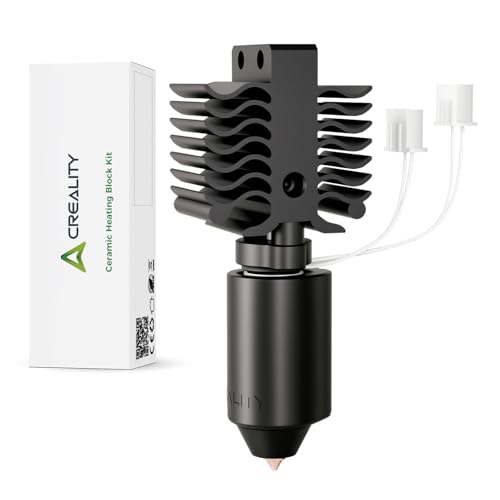
Replacing the stock hotend with the Creality Official Ender 5 Max Ceramic Heating Kit can significantly improve thermal uniformity. The 360° ceramic heater supports printing up to 300°C, which is beneficial for engineering-grade filaments like ABS and PC. Pair it with the Creality Official Ender 5 Max Nozzle, which uses hardened steel with a Mohs hardness of 7.8 and resists temperatures up to 450°C. This combination reduces clogging and extends service life, especially when printing abrasive materials.
For high-flow applications, the multi-channel design in the ceramic hotend increases flow rate by up to 30%, allowing you to maintain quality at higher speeds. If you frequently switch materials, the quick-disassembly feature saves time during changeovers.
Extruder Reliability
The extruder is the heart of consistent filament feeding. The Creality Official Ender 5 Max Extruder delivers 80N of extrusion force with a 6.25:1 gear reduction ratio, which minimizes stringing and improves retraction accuracy. If your current extruder is clicking or skipping, consider the FYSETC Original Extruder Motor, which comes with a pre-installed 12-tooth gear and operates with low noise. Both options are direct replacements that restore smooth extrusion without firmware changes.
For those running a print farm, having a spare extruder motor on hand can reduce downtime. The FYSETC motor’s stable holding torque is especially useful for long prints where under-extrusion can ruin a multi-hour job.
Build Plate and Surface Preparation
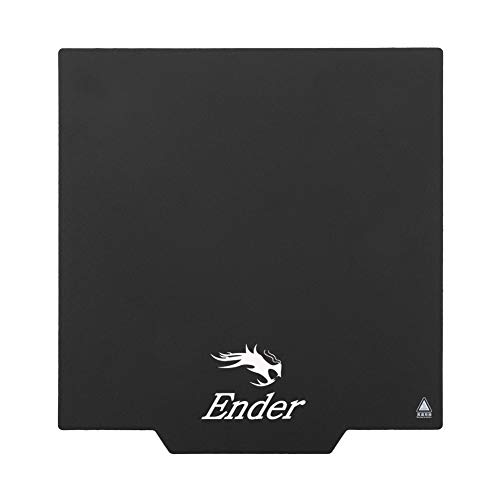
The Creality Ender 5 Max Epoxy Resin Build Plate features a double-sided textured spring steel surface with an epoxy coating. This design provides excellent adhesion for materials like PLA and ABS while allowing easy demolding without warping. The plate’s high flatness and elasticity mean you can bend it slightly to pop off prints without damaging the part or the surface.
If you work with flexible filaments like TPU or PA, the epoxy coating’s wear resistance helps maintain consistent bed adhesion over many cycles. The dual handles and locating holes make installation straightforward, so you can swap plates quickly between jobs. For more on upgrading your printer’s surface, see our creality falcon A1 laser machine review for insights on Creality’s build quality philosophy.
Final Thoughts
After evaluating the entire ecosystem, our top recommendation for most users is the Creality Ender 5 Max 3D Printer 400×400×400mm as your foundation, paired with the Creality Official Ender 5 Max Ceramic Heating hotend for faster, more uniform heating. The printer itself delivers the speed and volume that print farms need, while the ceramic hotend addresses the thermal consistency that serious makers demand. If you are just starting out, the base printer with the stock hotend is still a capable machine, but the upgrade path is clear and affordable. We are confident this combination will serve you well through hundreds of hours of production.
Frequently Asked Questions
Can the Creality Ender 5 Max print carbon-fiber reinforced filaments?
Yes, the Ender 5 Max supports PLA-CF, PA-CF, and PETG-CF materials, especially when you upgrade to the hardened steel nozzle. The ceramic hotend’s high thermal conductivity helps these composites flow evenly at high temperatures. For design preparation, our guide to best 3D printer design software for beginners in 2026 can help you get started.
How do I know if I need the dual-gear extruder upgrade?
If you experience under-extrusion, clicking, or inconsistent filament flow during long prints, the Creality Official Ender 5 Max Extruder with 80N force is a direct fix. It is also a good upgrade if you frequently print with abrasive filaments like carbon-fiber composites, as the hardened gears resist wear better than the stock unit.
Does the Ender 5 Max require a dedicated enclosure for high-temperature materials?
While the printer’s all-metal frame and 1000W bed handle high temperatures well, printing with materials like ABS or PC at 300°C may generate fumes. We recommend using the printer in a well-ventilated area or adding an enclosure with a fume extraction system. The 64-point auto-leveling still works perfectly inside an enclosure.
Can I control multiple Ender 5 Max printers from one computer?
Yes, the printer supports WLAN multi-printer control and grouped management. You can monitor and manage several units from a single interface, making it ideal for print farms. The tri-color status indicator lets you quickly check each printer’s state from across the room.