

🔥 3D Printer Black Friday Deals: picks worth watching →
You have just unboxed a fresh spool of premium PLA, excited to start a new project. But as the first layer goes down, you notice bubbling, stringing, and poor adhesion. The culprit is moisture absorbed by the filament. A quality filament dryer is the solution, and in this guide, we evaluate the best filament dryer options for 2026 to help you choose the right one for your needs. Whether you are a hobbyist or a professional, keeping your filament dry is essential for consistent, high-quality prints. For more tips on getting started, check out our guide on the best 3D printer filament for beginners.
What will your print cost? Use our filament cost calculator.
Product Comparison




Buying Guide: What to Look for in a Filament Dryer
Capacity and Spool Compatibility
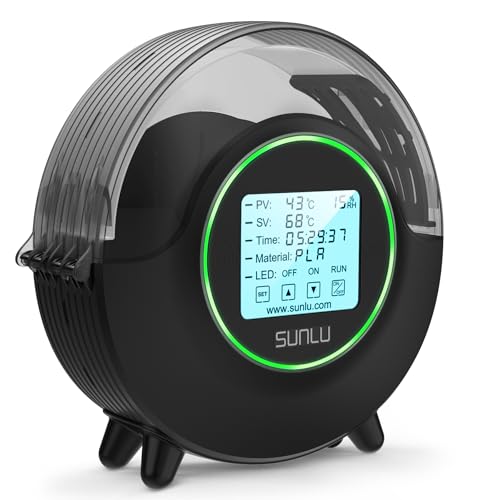
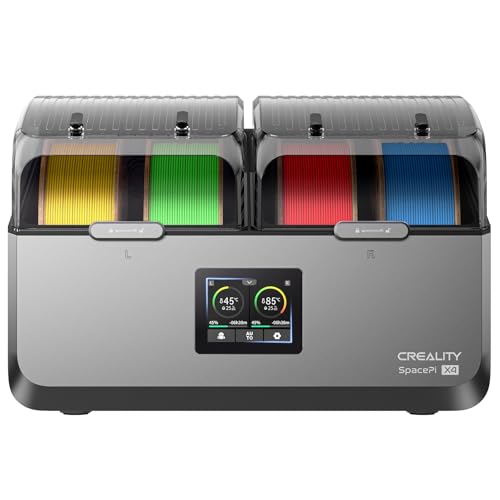
Consider how many spools you need to dry at once. Single-spool dryers are compact and affordable, while multi-spool models like the Creality Space Pi X4 can handle up to four spools simultaneously. This is ideal for high-volume users or those running multiple printers. Also check compatibility with spool diameters (1.75mm, 2.85mm, 3.00mm) and sizes up to 1kg or 2kg spools. For example, the SUNLU Official Filament Dryer S4 holds four spools, making it perfect for multi-color projects.
Heating Technology and Temperature Range
Different filaments require different drying temperatures. PLA and PETG dry well at 45-60°C, while engineering materials like Nylon, PC, or PAHT need up to 85°C. Look for dryers with PTC heating elements and built-in fans for even heat distribution. Models like the Creality Space Pi X4 reach 85°C with dual 200W heaters, while the SUNLU S2 offers 360° circular heating. Adjustable temperature settings give you flexibility for various materials. For optimal print settings with your dryer, see our best Creality print settings guide.
Ease of Use and Controls
User-friendly controls save time and frustration. Touch screens, like the 4.6-inch display on the SUNLU S2, allow quick one-key settings for different filament types. Knobs and buttons are also common. Look for features like timers (up to 48 hours), power-off memory, and real-time humidity monitoring. The Creality Space Pi SE has a simple knob and display, while the Comgrow SH01 uses touch buttons. Choose what feels intuitive for your workflow.
Build Quality and Sealing
A well-sealed enclosure prevents moisture from re-entering after drying. Silicone seals, snap-lock lids, and Teflon tube outlets are common in quality models. The Creality Filament Dryer Box 4 Spools features a silicone-sealed enclosure and an illuminated window to monitor spools without breaking the seal. Good build quality also includes insulation to maintain temperature and reduce energy consumption. For more on 3D printing accessories, check our anycubic kobra 3 V2 review.
Final Thoughts
After reviewing the top models, the choice comes down to your specific needs. For high-volume users requiring multi-spool drying and high-temperature capability, the Official Creality Filament Dryer stands out with its dual independent chambers and 85°C max temperature. For budget-conscious makers or those who need a compact, reliable dryer for single spools, the SUNLU Filament Dryer Box 2026 New Upgrade S1 offers excellent value with fan-assisted drying and easy controls. Either way, investing in a filament dryer will dramatically improve your print quality and reduce waste.
Frequently Asked Questions
How long does it take to dry filament in a dryer?
Drying time varies by filament type and dryer efficiency. Typically, PLA takes 4-6 hours, PETG 6-8 hours, and Nylon up to 12 hours at recommended temperatures. Many dryers have timers up to 48 hours for thorough drying.
Can I use a filament dryer for all types of 3D printer filament?
Most dryers are compatible with PLA, PETG, ABS, TPU, Nylon, and PC. Always check the temperature range: some dryers max out at 55-70°C, which may not be sufficient for engineering filaments like PA or PC. For high-temp materials, choose a dryer that reaches 80-85°C.
Do I need to dry filament if I store it in a vacuum bag?
Even vacuum-sealed filament can absorb moisture over time if the bag is not perfectly sealed or if the filament was already damp. A filament dryer ensures optimal dryness before printing, especially in humid environments. For more on filament storage, see our best buy 3D scanner guide for complementary tools.
Can I print directly from a filament dryer?
Yes, many dryers are designed for direct printing. They have filament outlets with Teflon tubes that feed into your printer. This keeps the filament dry during long prints. Models like the Creality Space Pi SE and SUNLU S4 are built for this purpose.


