🔥 3D Printer Black Friday Deals: picks worth watching →
When you are printing with engineering materials like polycarbonate (PC), nylon (PA), or PAHT, even a small amount of moisture can ruin your print. You might see bubbling, stringing, or poor layer adhesion. A standard filament dryer often cannot reach the high temperatures needed to properly dry these advanced materials. That is why finding the best filament dryer for engineering materials is essential for consistent, high-quality results. This guide reviews five top models designed to handle demanding filaments, helping you choose the right one for your workshop.
We have evaluated dryers from leading brands like Creality and SUNLU, focusing on features such as maximum temperature, heating uniformity, and capacity. Whether you need a dual-chamber system for different materials or a compact unit for a single spool, our picks cover a range of needs. For more insights on optimizing your 3D printing setup, check out our guide on best 3D printers with multiple colors.


What will your print cost? Use our filament cost calculator.
Buying Guide
Maximum Temperature and Heating Technology
Engineering materials often require drying temperatures above 70°C to effectively remove moisture. For example, nylon and PC may need 75°C to 85°C for optimal results. Look for dryers with PTC heaters or dual heating elements that can sustain these high temperatures consistently. The Official Creality Filament Dryer reaches 85°C, while the SUNLU E2 3D Printer Filament Dryer goes up to 110°C, making it suitable for annealing as well.
Uniform heating is just as important as maximum temperature. A dryer with a 360° heating fan or dual chambers ensures every part of the spool is dried evenly. Uneven heating can leave moisture pockets that lead to print defects. For a deeper dive into 3D printing fundamentals, visit our Maker Guides section.
Capacity and Chamber Design
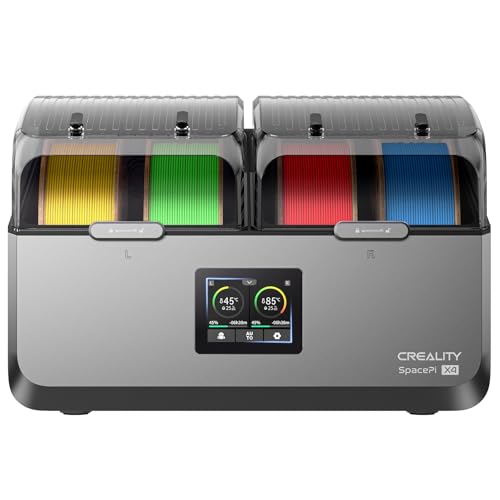
Consider how many spools you typically dry at once. Single-spool dryers are compact and affordable, but if you work with multiple materials, a dual-chamber or multi-spool dryer saves time. The Creality Filament Dryer Box 4 Spools holds up to four 1kg spools, and its dual independent chambers allow you to dry two different filament types at different temperatures simultaneously.
Dual-chamber designs also prevent cross-contamination of materials. For instance, you can dry PLA in one chamber at 50°C and nylon in the other at 80°C without mixing odors or moisture levels. This flexibility is a major advantage for professionals who switch between materials frequently.
Ease of Use and Control
User-friendly controls make a big difference in daily operation. Touchscreen interfaces and one-key presets for common filaments simplify setup. The 2026 New Creality Space PI Filament dryer features a 3.7-inch touchscreen with presets for 12 filament types, including composites like PLA-CF. Timers and power-off memory are also valuable, allowing you to set a drying cycle and walk away.
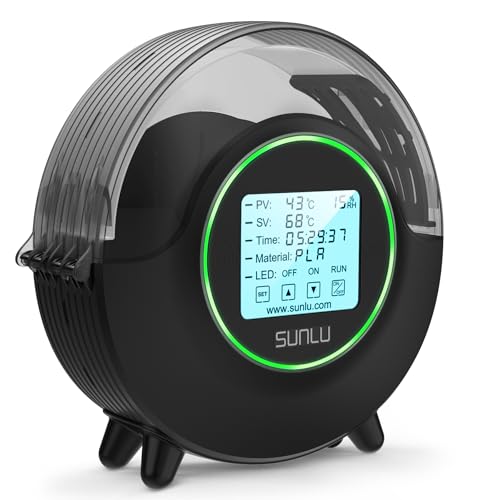
Look for dryers with real-time humidity and temperature displays. This feedback helps you confirm that the chamber is maintaining the desired conditions. Some models, like the SUNLU Official Filament Dryer S2, include a large LCD touchscreen that shows countdown time and humidity levels.
Build Quality and Additional Features
A well-sealed enclosure prevents moisture from re-entering the chamber during drying or storage. Silicone seals and insulated chambers improve efficiency and reduce energy consumption. The Official Creality Filament Dryer uses dual 200W PTC heaters with insulated chambers, reaching 85°C quickly while saving up to 40% energy in single-chamber mode.
Some dryers also double as storage boxes, maintaining low humidity even when not actively heating. This is useful for long-term filament preservation. For more on maintaining your equipment, see our Maker Supplies category.
Final Thoughts
Choosing the best filament dryer for engineering materials depends on your specific needs, such as temperature range, capacity, and budget. For users who need extreme heat and dual functionality, the SUNLU E2 3D Printer Filament Dryer stands out with its 110°C maximum and annealing capability. For those who prioritize versatility and energy efficiency, the Official Creality Filament Dryer offers dual independent chambers and 85°C drying, making it ideal for handling multiple engineering materials simultaneously. Both models deliver reliable performance for demanding prints.
Frequently Asked Questions
What temperature should I use for drying nylon filament?
Nylon typically requires a drying temperature between 70°C and 85°C. Most high-temperature dryers, like those from Creality and SUNLU, can handle this range. Always check the manufacturer’s recommendations for your specific nylon variant, as some may need up to 90°C for optimal results.
Can I dry PLA and ABS in the same dryer at the same time?
Yes, but only if the dryer has separate temperature-controlled chambers. PLA dries best at around 50°C, while ABS needs about 65°C. Dual-chamber models like the Creality Space Pi X4 allow you to set different temperatures for each chamber, so you can dry both materials simultaneously without issues.
How long does it take to dry engineering filaments?
Drying time varies based on the material and moisture level. Generally, engineering filaments like nylon or PC require 4 to 8 hours at the recommended temperature. High-power dryers with PTC heating can reduce this time. Using a dryer with a timer, you can set it overnight for convenience. For more tips, explore our Maker Guides.
Is a filament dryer necessary for all 3D printing materials?
While not always required for basic materials like PLA, a filament dryer is essential for engineering materials such as nylon, PC, and ABS. These materials are hygroscopic and absorb moisture quickly, leading to print defects. A dedicated dryer ensures consistent quality and reduces waste, making it a valuable investment for serious makers.