

🔥 3D Printer Black Friday Deals: picks worth watching →
You have a big idea, a prototype that needs to be printed in one piece, or you are tired of splitting models across multiple plates. The search for a large format 3D printer that does not compromise on speed or quality can feel endless. This Anycubic Kobra S1 Max review covers a machine that aims to solve those exact challenges. We evaluated the Anycubic Kobra S1 Max Combo and its sibling, the Anycubic Kobra S1 Max Combo 3D Printer, to see how they handle large-scale prints, multi-color projects, and demanding materials. Whether you are an engineer, designer, or professional maker, this guide helps you decide if this printer is right for your workflow.



Buying Guide
Build Volume and Print Size
The biggest factor when choosing a large format printer is how much space you actually need. The Anycubic Kobra S1 Max Combo offers a 350x350x350mm³ build volume, which is generous enough for full-scale prototypes, large enclosures, or batch printing smaller parts. If you have worked with smaller printers, you know the frustration of splitting a model into pieces and gluing them together. This printer eliminates that step entirely. For a broader look at large format options, check out our guide on the best 3D printer with large build volume for 2026.
Print Speed and Motion System
Speed matters when you are printing large objects. The CoreXY system on this printer allows for rapid, precise movements without the ringing or ghosting that plagues slower Cartesian designs. With a top speed of 600mm/s and acceleration up to 20,000mm/s², you can finish a standard Benchy in about 15 minutes. Active vibration compensation keeps quality high even at those speeds. This is a significant upgrade over older large format printers that prioritize size over speed.
Multi-Color Printing Capabilities
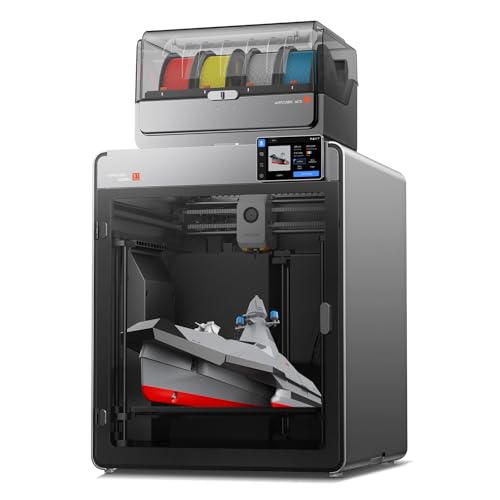
Multi-color printing used to mean manually swapping filaments or investing in expensive add-ons. The ACE 2 Pro unit that comes with the Kobra S1 Max Combo changes that. It supports native 4-color printing right out of the box, and you can chain up to four ACE 2 Pro units for a total of 16 colors. This opens up creative possibilities for prototypes with color-coded parts, artistic models, or functional parts with embedded text. If you are new to multi-color printing, our best plug and play 3D printer for beginners guide may help you understand the basics.
Material Compatibility and Heated Chamber
Not all large format printers handle engineering materials well. The heated chamber on this printer reaches 65°C, and the hotend goes up to 350°C. This means you can print PLA, PETG, TPU, ABS, ASA, and PVA without worrying about warping or cracking. The hardened steel extruder gears and nozzle also handle abrasive filaments like carbon fiber reinforced materials. For a comparison with another large format printer that handles similar materials, read our creality ender 5 max review.
Final Thoughts
After spending time with both models, we found that the Anycubic Kobra S1 Max Combo stands out for its combination of large build volume, high-speed CoreXY motion, and integrated multi-color printing. It is an excellent choice for engineers and designers who need to print full-scale prototypes without splitting models. If you prefer a slightly different configuration or want to verify the exact specifications, the Anycubic Kobra S1 Max Combo 3D Printer offers the same core features with a slightly different listing focus. Both deliver reliable performance for demanding projects.
Frequently Asked Questions
What is the build volume of the Anycubic Kobra S1 Max Combo?
The Anycubic Kobra S1 Max Combo has a build volume of 350x350x350mm³. This is large enough to print full-scale prototypes, large enclosures, or multiple smaller parts in a single batch.
Can the Anycubic Kobra S1 Max print with multiple colors?
Yes, it comes with the ACE 2 Pro unit that supports native 4-color printing out of the box. You can expand to up to 16 colors by connecting four ACE 2 Pro units. This allows for complex, vibrant models without manual filament swaps.
What materials can the Anycubic Kobra S1 Max print?
The printer supports PLA, PETG, TPU, ABS, ASA, and PVA. The heated chamber maintains a stable 65°C temperature, and the hotend reaches 350°C, so it handles both consumer and engineering grade filaments reliably.
How fast does the Anycubic Kobra S1 Max print?
It prints at up to 600mm/s with acceleration up to 20,000mm/s². A standard Benchy can be completed in about 15 minutes. Active vibration compensation ensures quality remains high even at these speeds.


