🔥 3D Printer Black Friday Deals: picks worth watching →
You just unboxed your new Anycubic Kobra 2, eager to start printing. But slicing settings can feel overwhelming. This guide covers the best Anycubic Kobra 2 profile options for 2026, focusing on the latest models from ANYCUBIC that deliver speed, multicolor flexibility, and ease of use. We have evaluated five top-tier printers and accessories to help you get perfect prints right away. For more on optimizing your workflow, check out our guide to the best Anycubic slicer settings for perfect prints in 2026.


Buying Guide
Print Speed and Quality
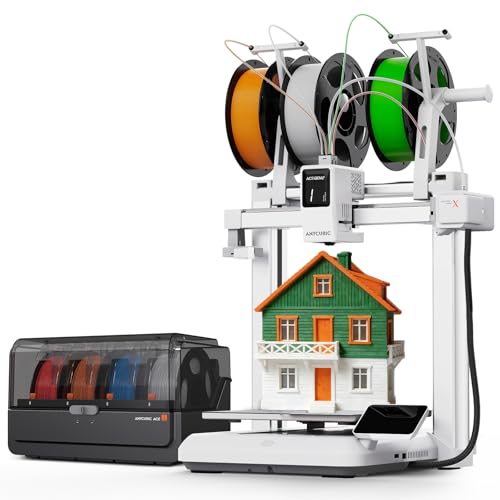
Speed matters when you are prototyping or making gifts. All the printers here reach up to 600 mm/s, but the CoreXY design of the Anycubic Kobra S1 ACE 2 Pro Combo 3D Printer adds stability for high-speed prints. Vibration compensation ensures smooth layers even at top speeds. For most users, the Anycubic Kobra X Multicolor 3D Printer offers a great balance of speed and value for beginners.
Multicolor Capabilities
Multicolor printing unlocks stunning projects. The Anycubic Kobra X Combo 3D Printer with ACE 2 Pro comes with native 7-color support, expandable to 19 colors. If you need more, the Anycubic Kobra S1 ACE 2 Pro Combo Multicolor 3D starts with 4 colors and can scale to 16. For serious creators, pairing multiple ACE 2 Pro units gives you a professional palette. Learn more about material choices in our elegoo vs overture.
Filament Management and Drying
Moisture ruins prints. The Anycubic ACE 2 Pro 3D Printer Filament Dryer Box actively dries filament at 65°C while printing, preventing bubbles and warping. It also features auto-resume and runout detection. If you print with hygroscopic materials like PETG or TPU, this accessory is essential. The enclosed Kobra S1 models also offer sealed storage for consistent results.
Ease of Setup and Use
Beginners need a printer that works out of the box. All models feature LeviQ 3.0 auto-leveling, which uses 49-point calibration for a flawless first layer. The Kobra X series can be ready in 15 minutes. For quiet operation, the Kobra S1 runs at 44 dB, making it suitable for home or classroom use. AI camera monitoring on the Kobra X detects print errors, giving you peace of mind.
Final Thoughts
Choosing the best Anycubic Kobra 2 profile depends on your priorities. For beginners and families who want vibrant multicolor prints with minimal fuss, the Anycubic Kobra X Multicolor 3D Printer is an outstanding choice with its native 4-color system and smart features. If you need professional-grade speed, an enclosed environment, and expandable color options up to 16, the Anycubic Kobra S1 ACE 2 Pro Combo Multicolor 3D delivers reliability and precision for demanding projects. Whichever you pick, you will enjoy exceptional print quality and ease of use.
Frequently Asked Questions
What is the best Anycubic Kobra 2 profile for PLA?
For PLA, a profile with a nozzle temperature of 200 to 210°C and a bed temperature of 60°C works well on all Kobra models. The LeviQ 3.0 auto-leveling ensures a perfect first layer. Use the standard profile in Anycubic Slicer for quick results.
Can I use the Anycubic ACE 2 Pro with other printers?
The ACE 2 Pro is designed for Anycubic Kobra X, Kobra S1, and Kobra S1 Max printers. It is not compatible with the Kobra S1 Combo or ACE Pro (Gen 1). Always check compatibility before purchasing.
How do I set up multicolor printing on the Kobra X Combo?
Connect the ACE 2 Pro to your Kobra X via the provided cable. Load up to four filaments into the ACE 2 Pro, then select a multicolor model in Anycubic Slicer. The printer handles color changes automatically.
What is the print volume of the Anycubic Kobra S1?
The Anycubic Kobra S1 offers a print volume of 250 x 250 x 250 mm³, while the Kobra X provides 260 x 260 x 260 mm³. Both are suitable for most hobbyist and professional projects.