🔥 3D Printer Black Friday Deals: picks worth watching →
After countless hours of printing with your Creality K2 Plus, you notice a subtle decline in layer adhesion or a faint stringing on overhangs. The nozzle, that tiny but mighty component, often bears the brunt of wear. This Creality K2 Plus nozzle review is crafted for makers who want to restore peak performance without guesswork. We evaluate two official upgrades: the original nozzle kit and the dedicated wiper module. For a broader look at FDM printers, check out our creality ender 3 S1 review for insights on another popular model.


What will your print cost? Use our filament cost calculator.
Buying Guide
Material Compatibility and Nozzle Composition
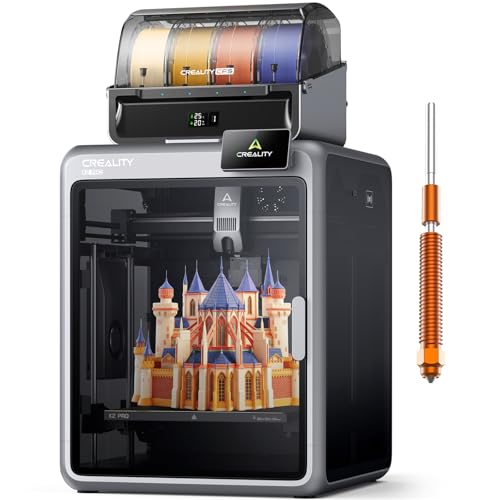
The Creality K2 Plus Nozzles feature a bimetallic design with a copper alloy core and hardened steel tip. This combination delivers high thermal conductivity for consistent melting while resisting abrasion from filled filaments like PLA-CF, PA-CF, or PET-CF. The titanium alloy heat break reduces heat creep, ensuring stable extrusion even during long prints. If you print primarily with standard PLA or PETG, this nozzle handles them effortlessly. For advanced users exploring composite materials, this upgrade is a reliable choice.
Quick-Swap Design and Maintenance
Time is precious, and the integrated all-metal nozzle simplifies replacement. You can swap it in minutes without disassembling the entire hotend. The package includes thermal grease to fill micro-gaps, enhancing heat transfer. This design minimizes filament leakage and clogs, keeping your workflow uninterrupted. For a comparison of multi-material systems, see our flashforge AD5X Multi-Material 3D printer review.
Nozzle Cleaning and Print Quality
A clean nozzle is the foundation of flawless prints. The Creality K2 Plus Nozzle Wiper Module automatically wipes the nozzle tip before each print, removing leftover filament and debris. This prevents blobs, stringing, and first-layer adhesion issues. The module includes five adhesive strips that are easy to replace. When the metal shrapnel deforms, swap the whole unit. This accessory is especially valuable for multi-material or color-changing prints where nozzle contamination is common. Learn more about large-format printing in our anycubic kobra S1 ace 2 pro combo review.
Compatibility and Installation Notes
Both products are designed exclusively for the Creality K2 Plus, K2 Pro, and Hi Combo printers. The nozzle kit fits seamlessly, while the wiper module requires a waste chute with a brass nut. If your printer lacks this, you will need to purchase a new waste chute. Always verify compatibility before ordering. For resin alternatives, check out our creality Halot-X1 combo resin printer review.
Final Thoughts
Whether you are a hobbyist seeking consistent results or a professional running production batches, these two accessories address the most common nozzle-related frustrations. The Creality K2 Plus Nozzles restore precision with their durable bimetallic tip and quick-swap convenience, while the Creality K2 Plus Nozzle Wiper Module proactively maintains cleanliness for every layer. Together, they form a maintenance duo that extends your printer’s lifespan and elevates output quality. Invest in these official parts to keep your K2 Plus performing at its best.
Frequently Asked Questions
How often should I replace the nozzle on my Creality K2 Plus?
Replace the nozzle every 3 to 6 months under regular use, or sooner if you notice clogs, stringing, or uneven extrusion. Using abrasive filaments like carbon fiber composites will accelerate wear. The integrated nozzle kit makes replacement quick and straightforward.
Can I use the Creality K2 Plus nozzle wiper module with other printers?
No, the wiper module is specifically designed for the Creality K2 Plus, K2 Pro, and Hi Combo printers. Its mounting mechanism and waste chute compatibility are unique to these models. Always check your printer’s specifications before purchasing.
Does the Creality K2 Plus nozzle kit support flexible filaments like TPU?
Yes, the bimetallic nozzle handles TPU effectively, thanks to its smooth inner wall and precise 0.4mm aperture. The titanium alloy heat break reduces heat creep, which is critical for flexible materials that tend to jam in standard hotends.
What is the best way to clean the nozzle wiper strips?
You can wipe the adhesive strips with a dry cloth to remove loose residue. If the strip becomes heavily worn or loses adhesion, replace it with one of the five included strips. For severe wear, consider replacing the entire wiper module. For beginner tips, see our Best Rated 3D Printer for Beginners guide.