

🔥 3D Printer Black Friday Deals: picks worth watching →
You have just unboxed a new Creality K2 Plus Combo and you are eager to print a multi-color project. You load four spools of filament into the CFS unit and expect the printer to recognize each one automatically. But without RFID technology, you must manually select material profiles and risk misconfigurations that waste time and material. Creality Hyper PLA with RFID solves this problem by letting the CFS identify each spool and adjust settings instantly. This Creality PLA RFID review covers four RFID-enabled filament options that bring intelligence and speed to your workflow. Whether you are a hobbyist or a professional, these spools promise seamless integration with Creality multi-color systems. For a broader look at material choices, check out our guide on best 3D printer filament types and uses for 2026.



What will your print cost? Use our filament cost calculator.
Buying Guide: How to Choose Creality Hyper PLA RFID Filament
RFID Compatibility and CFS Integration
RFID technology is the core feature that sets these filaments apart. When you load a spool into the Creality CFS, the embedded chip communicates the material type, color, and optimal print settings to the printer. This eliminates guesswork and reduces setup time for multi-color prints. For the K2 Plus Combo, Hi Combo, and i7/i8 series, RFID recognition ensures that each spool is used correctly. If you plan to expand your multi-color capabilities, prioritize filaments that support this smart feature. For a deep dive into filament durability, read our creality PETG black review.
Print Speed and Flow Consistency
Creality Hyper PLA is engineered for high-speed printing up to 600 mm/s. This is critical if you run a print farm or need rapid prototyping. The advanced formulation maintains consistent extrusion even at top speeds, preventing under-extrusion or stringing. Look for filaments that specify a wide speed range, like 30 to 600 mm/s, to cover both fast and detailed prints. Consistent flow also depends on dimensional accuracy, which we cover next.
Dimensional Accuracy and Surface Finish
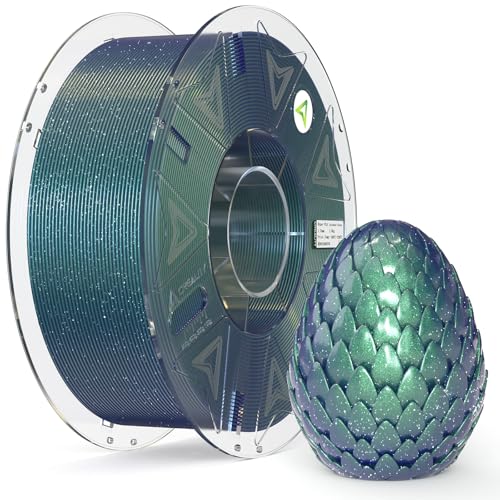
Precision matters for parts that fit together or require smooth aesthetics. Creality Hyper PLA filaments boast a tolerance of ±0.03 mm, ensuring uniform diameter and reliable feeding. This reduces the risk of clogs and layer inconsistencies. For projects that demand a glossy finish without post-processing, some variants like the Stardust Green offer a sparkling effect straight off the print bed. If you print functional parts, consider toughness as well. Our Creality PETG Filament Properties Review for 2026 discusses material strength in detail.
Spool Size and Value for Multi-Color Projects
Multi-color printing often requires multiple spools, and buying in bulk can save money and reduce waste. Creality offers 2-pack and 4-pack options that include popular colors like black, white, blue, and red. The 4KG bundle is ideal for building a sample library or tackling large projects. For outdoor applications, you may want materials with UV resistance. Check our best 3D printer filament for outdoor use for more options.
Final Thoughts
Creality Hyper PLA with RFID transforms the multi-color printing experience by automating material recognition and optimizing settings for each spool. For users who want a reliable workhorse for everyday projects, the Creality Hyper PLA Filament 1.75mm, Black, 2-Pack offers excellent value with its high-speed performance and precise tolerance. If you prefer a visually striking finish and a compact single-spool option, the Creality RFID Hyper PLA Filament 1.75mm in Stardust Green delivers a shimmering galaxy effect without any post-processing. Both choices integrate seamlessly with Creality CFS systems and provide the speed and reliability that modern printing demands.
Frequently Asked Questions
Does Creality Hyper PLA RFID work with all 3D printers?
RFID functionality is designed for Creality printers that support CFS, such as the K2 Plus Combo and Hi Combo. However, the filament itself can be used on any standard 1.75 mm 3D printer by manually selecting a PLA profile. The RFID chip only communicates with compatible systems.
What is the maximum print speed for Creality Hyper PLA RFID?
These filaments are rated for speeds up to 600 mm/s while maintaining good layer adhesion and surface quality. For best results, start with a moderate speed and gradually increase based on your printer’s capabilities. The recommended nozzle temperature range is 190 to 230 °C.
Can I use Creality Hyper PLA RFID for outdoor prints?
PLA is not inherently UV-resistant and may degrade over time in direct sunlight. For outdoor applications, consider PETG or specialized outdoor filaments. Our creality PETG CF review covers a durable alternative.
How does the RFID chip improve multi-color printing?
When you load multiple RFID spools into the CFS, the system automatically detects each filament’s color and material profile. This prevents color mismatches and ensures correct temperature and speed settings for each layer, reducing failed prints and material waste.


