🔥 3D Printer Black Friday Deals: picks worth watching →
You have just finished a single-color print that took hours, and now you are staring at a model that would look incredible in multiple hues. The idea of manually swapping filaments or dealing with a purge tower that wastes half a spool is frustrating. This is exactly where the Anycubic Ace Gen 2 system steps in to change the game. In this Anycubic Ace Gen 2 review, we will cover how this innovative filament hub works, which printers it pairs with, and whether it is the right upgrade for your workspace. Whether you are a hobbyist looking to add vibrant gradients or a professional seeking efficient batch production, this guide is for you. For more context on reducing waste, check out our guide on the best 3D printer with no waste.


Buying Guide
Multicolor Capability and Purge Waste
The most significant pain point in multicolor printing is the amount of filament wasted during color changes. Traditional systems can purge a large amount of material for each transition, which adds up fast. The Ace Gen 2 addresses this head-on by reducing purge length by over 81%, meaning you keep more of your expensive filament on the spool and less in the waste bin. When evaluating a multicolor system, look for how efficiently it handles these swaps, as this directly impacts your material costs and print time.
With the Ace Gen 2, you can achieve up to 19 colors by linking multiple units, which opens up a world of possibilities for gradient models and complex designs. For a deeper look at software that complements these systems, see our recommendations for the anycubic kobra 2 best slicing software.
Compatibility and Printer Integration
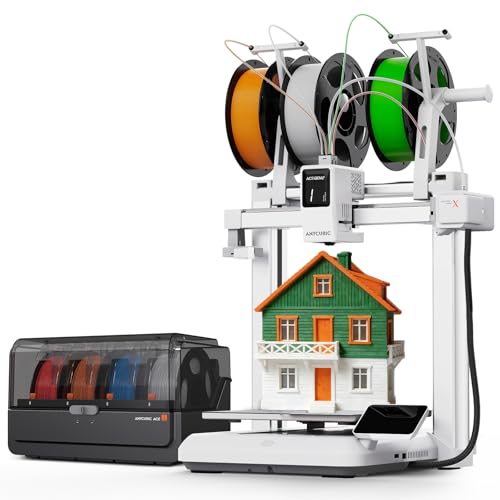
Not every printer works seamlessly with a multicolor system. The Ace Gen 2 is designed to integrate with select Anycubic models, such as the Kobra X Combo and the Kobra 3 Max V2. Before purchasing, confirm that your printer supports the Ace Gen 2’s communication protocol and physical mounting. The system also includes intelligent identification and auto-refill features, which simplify the workflow when you are running multiple prints.
If you are starting from scratch, a bundled combo like the Kobra X Combo provides native 7-color support out of the box, making it a turnkey solution. For those who already own a compatible printer, the standalone Ace Gen 2 unit can be added as an upgrade.
Active Drying and Filament Management
Moisture is the enemy of high-quality prints, especially with materials like PETG and TPU. The Ace Gen 2 doubles as an active dryer, maintaining a 65°C environment inside the unit. This “dry-while-print” functionality ensures that your filament stays in peak condition throughout long jobs, reducing the risk of bubbling or weak layer adhesion. Look for a system that offers both storage and drying, as this saves you from purchasing a separate filament dryer.
The unit also supports automatic refill, so when one spool runs out, the system can switch to a backup without interrupting your print. This is a valuable feature for print farms or overnight runs.
Speed and Print Quality
Speed is a major factor when you are producing multicolor models, as each color change adds time. The Ace Gen 2 is engineered to work with high-speed printers that can reach up to 600 mm/s. Combined with dynamic flow calibration and vibration compensation, the system delivers smooth surface finishes even at high velocities. When evaluating a printer to pair with the Ace Gen 2, consider its maximum acceleration and whether it includes features like AI monitoring for error detection.
For resin printing, the Photon P1 Max offers a different kind of speed through its large 18.3L build volume and 12K screen, which is ideal for detailed models that do not require color mixing.
Final Thoughts
After evaluating the entire lineup, we believe the Anycubic Ace Gen 2 represents a genuine leap forward for multicolor FDM printing, especially for users who want to minimize waste and maximize color complexity. If you are looking for an all-in-one solution that includes a high-speed printer with native multicolor support, the Anycubic Kobra X Combo High-Speed 3D Printer is an outstanding choice that bundles the Ace Gen 2 directly. For those who need a massive build volume for resin projects and prefer a different workflow, the ANYCUBIC Photon P1 Max, 18.3L Resin 3D Printer offers exceptional detail and a smart heating system that keeps your resin at optimal temperature, making it a powerful companion for large-scale, single-color prints.
Frequently Asked Questions
How many colors can the Anycubic Ace Gen 2 support?
The Ace Gen 2 supports up to 7 colors out of the box with a single unit. By linking up to four Ace Gen 2 units together, you can expand that to a total of 19 colors, giving you extensive flexibility for complex multicolor projects.
Does the Ace Gen 2 work with any 3D printer?
No, the Ace Gen 2 is designed to integrate specifically with compatible Anycubic printers, such as the Kobra X Combo and the Kobra 3 Max V2. It uses a proprietary communication protocol, so it will not work with printers from other brands without modification. Always check the manufacturer’s compatibility list before purchasing.
How much purge waste does the Ace Gen 2 reduce?
According to Anycubic, the Ace Gen 2 technology reduces purge length by 81.25% compared to traditional multicolor systems. This translates to significantly less filament wasted during color changes, which can save you money and reduce print times in the long run.
Can the Ace Gen 2 dry filament while printing?
Yes, the Ace Gen 2 features an active drying system that can maintain a temperature of up to 65°C. This allows you to dry filament while it is being used for printing, which is especially useful for moisture-sensitive materials like PETG and TPU. This feature helps maintain consistent print quality throughout long sessions.