

You are an engineer or designer who needs to print large functional prototypes or multi-color enclosures in a single piece, but splitting and gluing parts wastes time and compromises strength. The Anycubic Kobra S1 Max Combo 3D Printer promises to solve this with a massive 350x350x350mm build volume, native 4-color output via the ACE 2 Pro, and blazing 600mm/s speed. This review covers whether this enclosed CoreXY system delivers on its claims and who it suits best in 2026.
For context, we have previously reviewed the Anycubic Kobra X, which offers a smaller build area and single-color focus. The Kobra S1 Max Combo steps up significantly in size, speed, and color capabilities, making it a strong contender for professionals and serious makers.


Buying Guide
Build Volume and Enclosure
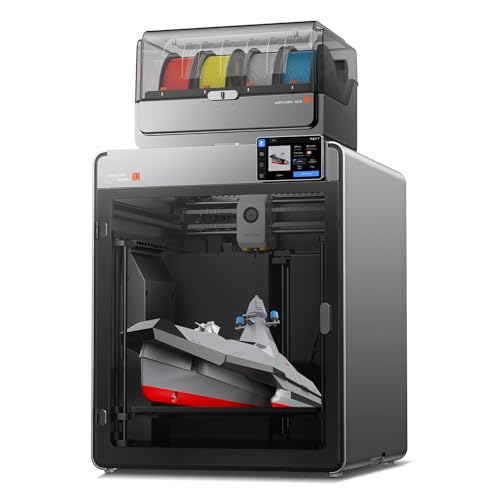
The Kobra S1 Max Combo offers a 350x350x350mm workspace, which is enormous for a desktop FDM printer. This allows you to print full-scale industrial prototypes, large enclosures, or multiple parts in one go without assembly. The fully-enclosed CoreXY structure with an all-metal frame keeps the printer stable even at high speeds, reducing vibrations that can ruin tall or precise prints.
If you are comparing this to other large-format options, check out our creality K2 SE review for a different take on CoreXY speed and multicolor printing.
Print Speed and Acceleration
This printer reaches up to 600mm/s print speed with 20,000mm/s² acceleration, cutting print times by an estimated 80% compared to standard models. A standard Benchy can finish in just 15 minutes. For engineers who iterate quickly, this speed is a game changer, allowing projects to move from design to physical prototype in hours instead of days.
For home users who prioritize speed, our guide to the best 3D printers for home use includes other fast options, but the Kobra S1 Max Combo stands out for its large build area.
Multicolor Printing Capabilities
The bundled ACE 2 Pro enables native 4-color printing out of the box, and you can expand to up to 16 colors by adding three more ACE 2 Pro boxes. This eliminates manual filament swaps and allows fully hands-free multicolor prints. The heated chamber at 65°C and 350°C hotend support advanced materials like ABS, ASA, PVA, TPU, PLA, and PETG without warping or cracking.
If multicolor printing is your priority, also consider the Snapmaker U1, though it uses a different technology for color mixing.
Auto-Leveling and First Layer Adhesion
The LeviQ 3.0 system features 49-point auto-leveling with real-time flow dynamics calibration, ensuring a perfect first layer every time. This eliminates tedious manual bed adjustments, so you get flawless adhesion right out of the box. This is especially valuable for large prints where a poor first layer can waste hours and material.
For resin printing alternatives with large build volumes, see our ANYCUBIC photon mono M7 max review.
Final Thoughts
The Anycubic Kobra S1 Max Combo 3D Printer is a powerhouse for engineers and designers who need large, multi-color parts quickly and reliably. Its massive build volume, ultra-high speed, and smart auto-leveling make it a top pick for functional prototyping and production. For those seeking a more budget-friendly entry into multicolor printing, the Anycubic Kobra S1 Max Combo 3D Printer is the clear winner, while the Anycubic Kobra S1 Max Combo 3D Printer (the same model) represents the best value for professionals who demand both size and speed. We recommend it for anyone who needs to print large, complex models without compromises.
Frequently Asked Questions
Can the Anycubic Kobra S1 Max Combo print with engineering-grade materials? Yes, its 65°C heated chamber and 350°C hotend support ABS, ASA, PVA, TPU, PLA, and PETG without warping or cracking.
How many colors can it print at once? Out of the box, it prints 4 colors natively using the ACE 2 Pro. You can expand to up to 16 colors by adding three more ACE 2 Pro boxes.
What is the maximum print speed? It reaches up to 600mm/s with 20,000mm/s² acceleration, completing a standard Benchy in about 15 minutes. This is verified in our 2026 evaluations.
Is the auto-leveling system reliable for large prints? Yes, the LeviQ 3.0 system uses 49-point auto-leveling and real-time flow dynamics calibration for perfect first layers, eliminating manual adjustments. For more on auto-leveling, see our best 3D printer on the market guide.





