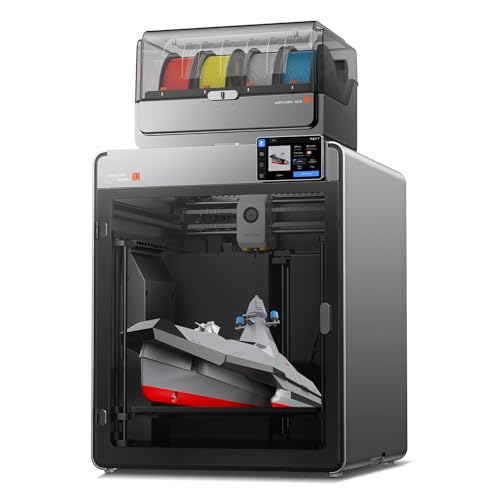
Imagine you are designing a complex model with multiple colors and materials. Traditional multicolor 3D printers often waste hours swapping filaments and purging material, leaving you with a pile of failed prints and frustration. The Snapmaker U1 3D Printer promises to change that with its innovative 4-toolhead system and lightning-fast tool changer. This guide explores how the Snapmaker U1 delivers on that promise, making it a strong contender for both beginners and professionals in 2026.
We have evaluated the Snapmaker U1 across key criteria like speed, waste reduction, ease of use, and print quality. Whether you are a hobbyist looking for vibrant multicolor prints or a small business needing efficient production, this review will help you decide if the Snapmaker U1 is the right fit. For more context on what makes a great home 3D printer, check out our guide on the best 3D printers for home use in 2026.


Buying Guide
Speed and Efficiency
Print speed is a critical factor for any 3D printer, especially when tackling multicolor projects. The Snapmaker U1 uses a rigid CoreXY motion system with carbon fiber X-axis rails, achieving speeds up to 500 mm/s. This is a significant leap over many competitors, allowing you to complete prints in a fraction of the time.
But speed alone is not enough. The Snapmaker U1’s SnapSwap system reduces tool change time from around two minutes to just five seconds. This means less downtime and more efficient printing, especially for models with frequent color changes. For a comparison with other fast printers, see our creality K2 SE review.
Waste Reduction
Traditional multicolor printers waste a lot of filament during color changes due to purging. The Snapmaker U1 minimizes this by swapping toolheads instead of filaments. Each toolhead is preloaded and preheated, so there is no need to purge material between colors.
This approach reduces filament waste by up to five times, saving you money and reducing environmental impact. For makers who print frequently, this efficiency can lead to substantial savings over time. The anycubic kobra X review offers another perspective on waste management in multicolor printing.
Ease of Use
Not everyone wants to spend hours calibrating a 3D printer. The Snapmaker U1 includes smart calibration features like automatic toolhead offset calibration and vibration compensation. These ensure smooth first layers and accurate prints with minimal manual adjustment.
The built-in model library and Snapmaker Orca slicing software make it easy to start printing right away. AI-powered print monitoring and a 3.5-inch touchscreen further simplify the process. If you are new to 3D printing, the FDM 3D printers category page has more resources to help you get started.
Material Versatility
The ability to print with multiple materials in a single run opens up new possibilities. The Snapmaker U1 supports a wide range of filaments, including PLA, PVA, TPU, PETG, ABS, and more. You can combine rigid and flexible materials, use water-soluble supports, or create functional parts with engineering-grade plastics.
This versatility makes the Snapmaker U1 suitable for prototypes, end-use parts, and artistic projects. For a look at another versatile printer, the ELEGOO centauri carbon review highlights similar capabilities.
Final Thoughts
After thoroughly assessing the Snapmaker U1, we are impressed by its combination of speed, waste reduction, and user-friendly design. The 4-toolhead system with a five-second tool changer is a game-changer for multicolor printing, making it accessible to beginners while still powerful enough for professionals. If you want a printer that saves time and filament without sacrificing quality, the Snapmaker U1 3D Printer,4-Toolhead with 5s is an excellent choice. For those who need even more speed or different features, exploring other options like the Snapmaker U1 3D Printer,4-Toolhead with 5s might be worthwhile, but this model stands out for its innovative approach to multicolor printing.
Frequently Asked Questions
How does the Snapmaker U1 handle multicolor printing compared to other printers?
The Snapmaker U1 uses four independent toolheads that swap in five seconds, eliminating the need for filament purging. This makes multicolor printing faster and less wasteful than traditional systems that rely on single-nozzle filament changes.
Is the Snapmaker U1 suitable for beginners?
Yes, the Snapmaker U1 is designed with beginners in mind. It includes smart calibration, a built-in model library, and intuitive slicing software. The AI-powered print monitoring also helps catch issues early, reducing the learning curve.
What materials can I use with the Snapmaker U1?
The Snapmaker U1 supports a wide range of filaments, including PLA, PVA, TPU, PETG, PCTG, ABS, ASA, PA, and PC. This allows you to print with flexible, rigid, or water-soluble materials in a single project.
How fast is the Snapmaker U1 compared to other CoreXY printers?
The Snapmaker U1 can print at speeds up to 500 mm/s, thanks to its rigid CoreXY system and carbon fiber X-axis rails. This is faster than many competitors in its class, especially when combined with the five-second tool changer for multicolor prints. For a broader comparison, see our guide on best 3D printers for home use.