You are a professional mechanic or a serious DIYer who has spent hours chasing intermittent electrical gremlins or struggling to communicate with a modern vehicle’s network of modules. A basic OBD2 scanner that reads and clears codes simply does not cut it anymore. You need a tool that can see the whole picture, perform active tests, and even handle ECU programming. This review focuses on the XTOOL IP919 Pro V2.0, a high-end diagnostic scanner designed to meet those exact demands. We will assess its key features, performance improvements, and overall value for professionals in 2026. For those exploring other high-end tools, check out our guide on the best laser engraver for PMAGs for a different perspective on precision tools.


Buying Guide
Diagnostic Depth and Vehicle Coverage
Not all scan tools are created equal. The XTOOL IP919 Pro V2.0 supports over 100,000 vehicle models from 1996 onward, including newer protocols like CAN FD and DoIP. This broad coverage ensures you can work on everything from a classic Ford to a brand new FCA vehicle requiring AutoAuth. The ability to move beyond generic OBD2 codes into manufacturer-specific systems is what separates a professional tool from a consumer gadget.
Active Testing and Bidirectional Control
Passive code reading only tells you half the story. A truly capable diagnostic tool lets you interact with the vehicle’s systems. The IP919 Pro’s bidirectional control allows you to command components like radiator fans, throttle actuators, and interior lights to verify their operation. This active testing capability saves hours of guesswork and confirms whether a replaced part is functioning correctly. It is a feature that pays for itself on the first complex repair.
ECU Programming and Reset Services
Modern repairs often require more than just swapping parts. Many vehicles need ECU coding, programming, or specific resets after a component replacement. The IP919 Pro V2.0 includes 51+ reset services for functions like ABS bleeding, SAS calibration, and oil resets. It also supports online and offline ECU programming for several major brands, including BMW and Benz. This capability turns a simple diagnostic session into a complete repair solution. If you are also into laser engraving for custom projects, you might find our review of the best laser engraver for board games interesting.
User Interface and Workflow Efficiency
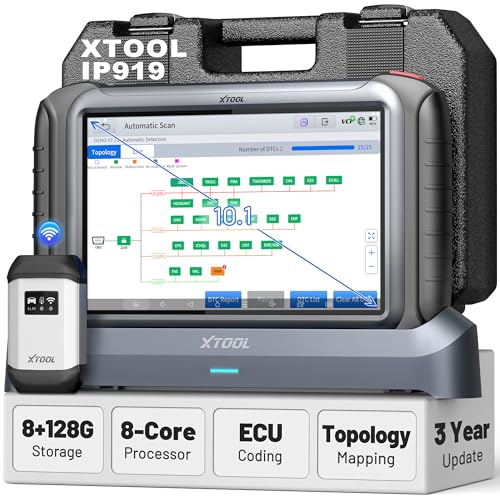
Speed matters in a busy shop. The IP919 Pro V2.0 runs on Android 10.0 with an 8-core processor and a large 10.1-inch sunlight-readable touchscreen. Its topology map provides a color-coded view of all vehicle modules, helping you pinpoint root causes faster. The pre-scan and post-scan report feature adds a layer of professionalism, allowing you to document the vehicle’s health before and after your work, which builds trust with customers.
Final Thoughts
For the professional mechanic or advanced enthusiast who demands more than a basic code reader, the XTOOL IP919 PRO V2.0 ECU Programming Scan Tool is a powerful investment that significantly expands your diagnostic and repair capabilities. Its combination of broad vehicle coverage, bidirectional control, and ECU programming functions makes it a versatile centerpiece for any serious workshop. Whether you are troubleshooting a complex network issue or performing a routine brake bleed, this tool provides the depth and speed needed to get the job done efficiently and accurately.
Frequently Asked Questions
Can the XTOOL IP919 Pro V2.0 program ECUs for all car brands? It supports online and offline ECU programming for several major brands like BMW, Benz, Audi, Ford, and Mazda. Coverage varies by model, so it is best to verify compatibility for your specific vehicle before purchase.
Does this scanner require a subscription for FCA vehicles? Yes, the FCA AutoAuth feature for Chrysler, Dodge, and Jeep models requires a separate account and subscription plan, which is administered by FCA. Alternatively, you can use the XTOOL 12+8 cable as a workaround.
How does the topology map help with diagnostics? The topology map displays a color-coded network of all vehicle modules, showing their connections and status. This visual overview helps you quickly identify which module is causing an issue, streamlining the diagnostic process.
Is the IP919 Pro V2.0 suitable for a beginner DIYer? While it is a professional-grade tool with a steep learning curve, its guide function provides step-by-step instructions for many procedures. Beginners willing to invest time in learning will find it capable, but it is best suited for those with some diagnostic experience.