You have a vision for a custom gift, a business logo, or a creative project, but the setup feels overwhelming. The Creality Falcon A1 laser machine review simplifies your decision. This guide covers the full Falcon A1 lineup, from the accessible 10W models to the powerful Pro 20W variants with smart features. Whether you are a hobbyist or a small business owner, we help you find the right tool for your work.



Buying Guide
Laser Power and Material Capability
Laser power determines what materials you can engrave and cut efficiently. The 10W blue diode laser handles wood, leather, acrylic (with coating), and some metals with a marking spray. It cuts through 6mm wood in a single pass. If you need to cut thicker materials or work faster, the 20W Pro model provides more energy for deeper cuts on basswood and black acrylic.
Smart Features and Ease of Use
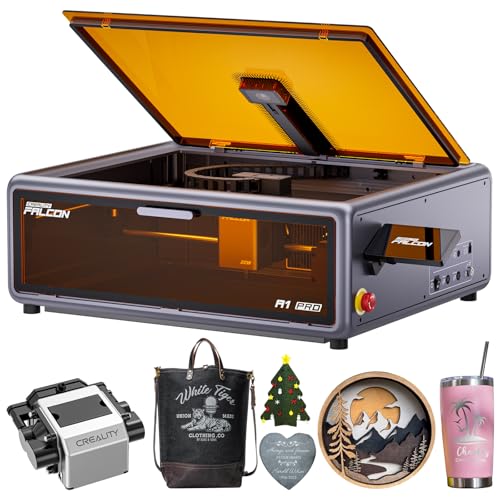
Time is valuable. The Falcon A1 series reduces setup complexity with a built-in HD camera that positions your design automatically. The 10W models recognize the material and apply optimal settings, while the Pro 20W adds autofocus in three seconds. For beginners, the Falcon A1C includes AI tools like one-tap engraving from a photo. For a deeper look at user-friendly options, see our best laser engraver under $500 guide.
Safety and Enclosure Design
All Falcon A1 models are Class 1 laser certified, meaning the protective enclosure filters over 99% of laser radiation. The dual-door design provides easy access while blocking smoke and noise. Safety features include an emergency stop button and automatic pause when the lid opens. This makes them suitable for home workshops and shared spaces.
Software and Compatibility
The Falcon Design Space software is free and intuitive, offering design tools and direct control. It also supports popular alternatives like LightBurn and LaserGRBL, giving you flexibility for advanced projects. The Pro 20W adds a touchscreen for file selection and monitoring without a computer, improving workflow efficiency.
Final Thoughts
After evaluating the entire Falcon A1 range, we recommend the CREALITY FALCON A1 10W Laser Engraver for beginners and hobbyists because it delivers reliable engraving out of the box at a accessible price. For professionals needing higher power and precision, the Creality Falcon A1 Pro 20W Laser Engraver with its autofocus and touchscreen is the superior choice, especially for batch production and thicker materials. Whichever model you choose, you are investing in a versatile tool that grows with your creativity.
Frequently Asked Questions
Can the Creality Falcon A1 engrave metal?
Yes, but with a condition. The 10W and 20W blue laser modules can mark coated metals or bare metal surfaces treated with a marking spray. They cannot engrave highly reflective metals like mirror-finished aluminum or mirrored acrylic, as this can damage the laser.
How fast is the Falcon A1 compared to other laser engravers?
The Falcon A1 series uses a CoreXY motion system that achieves speeds up to 600 mm/s, roughly three times faster than traditional belt-driven machines. This makes it highly efficient for batch production and detailed designs.
Does the Falcon A1 come fully assembled?
Yes, all Falcon A1 models arrive pre-assembled and ready to use out of the box. You only need to connect the power, set up the software, and start engraving. This is a major advantage for beginners who want to avoid complex assembly.
What is the working area of the Falcon A1?
The standard Falcon A1 models have a working area of 381 x 305 mm, suitable for most small to medium projects. The Falcon A1C has a smaller 150 x 150 mm work area but is more compact. Larger projects can use compatible accessories like the Falcon roller to engrave curved objects.