🔥 3D Printer Black Friday Deals: picks worth watching →
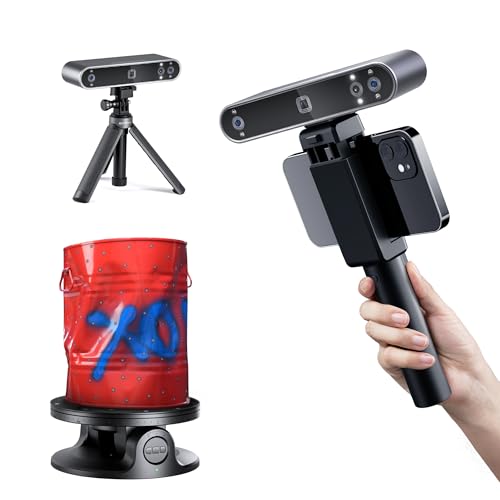
Imagine you are designing a custom part for a vintage car restoration, and you need to capture every curve and thread of the original component with sub-millimeter precision. You could spend hours with calipers and manual modeling, or you could pick up a handheld 3D scanner that does all the work in minutes. That is exactly the promise of the Revopoint MIRACO Pro 3D scanner, an all-in-one device that eliminates the need for a tethered computer and complex setups. In this Revopoint MIRACO Pro 3D scanner review, we will walk through its key features, compare it with other top models, and help you decide if it is the right tool for your projects. Whether you are a professional engineer, a hobbyist 3D printer, or a product designer, this guide covers the essentials you need to know. For a broader look at entry-level options, check out our Best Handheld 3D Scanner for Beginners in 2026 guide.




Buying Guide
Accuracy and Precision
When choosing a 3D scanner, the most critical factor is how accurately it captures geometry. For industrial reverse engineering or quality inspection, you need single-frame precision of 0.02 mm or better. The Revopoint MIRACO Pro delivers 0.02 mm single-frame precision, while the MetroY Pro and MetroX Pro go down to 0.01 mm with blue laser technology. If you are scanning small, detailed parts like gears or jewelry, higher precision is essential. For larger objects like car body panels, volumetric accuracy becomes more important, so look for specifications like 0.02 mm + 0.05 mm x L(m).
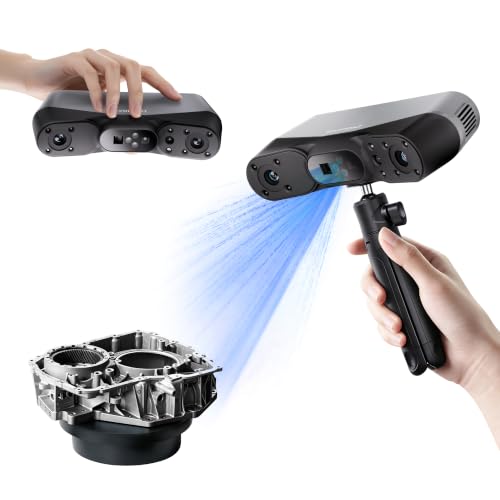
Also consider whether the scanner uses structured light or laser technology. Blue laser scanners, such as the Revopoint MetroY Pro, handle shiny and dark surfaces without spray, which saves time and avoids residue on delicate parts. For a detailed comparison of laser versus structured light, read our revopoint MetroY pro 3D scanner review.
All-in-One vs. Computer-Tethered
One of the biggest decisions is whether you want a standalone scanner or one that requires a laptop. The Revopoint MIRACO series, including the MIRACO Pro and MIRACO Plus, runs entirely on the device itself. You can scan, edit, and export models without any external computer. This is ideal for fieldwork, outdoor scanning, or situations where carrying a laptop is inconvenient. The MIRACO Pro has 32 GB of RAM, allowing it to capture up to 10,000 frames in a single session.
On the other hand, tethered scanners like the Revopoint MetroY Pro or Creality Ferret Pro offer higher raw processing power and often lower cost, but they require a PC or smartphone connection. If you already have a powerful laptop, a tethered scanner can be a more affordable route to high accuracy. For a portable, all-in-one solution, the MIRACO line is hard to beat. Explore our Best Low Cost 3D Scanners for Makers and Hobbyists in 2026 for budget-friendly alternatives.
Color Capture and Texture
If your projects require photorealistic 3D models, color capture quality matters. The Revopoint MIRACO Pro features a 48 MP RGB camera with Flash LEDs that evenly illuminate the subject, producing vibrant, true-to-life textures. The MIRACO Plus improves on this with enhanced optics and a 48 MP camera as well. For industrial inspection where color is less important, a monochrome scanner like the MetroY Pro may suffice, but for heritage preservation, product design, or e-commerce, full-color scanning is a must.
Also check the software’s ability to align color data with geometry. Revopoint’s Revo Scan software handles this well, and the MIRACO series processes everything on board. For a deeper dive into color scanning capabilities, see our revopoint POP3 plus 3D scanner review.
Scanning Modes and Versatility
Different objects require different scanning approaches. The best scanners offer multiple modes: single-shot for high accuracy on small objects, continuous mode for speed, and turntable mode for automated capture. The Revopoint MIRACO Pro includes Near and Far modes, letting you switch between scanning tiny screws and large machinery. The MetroY Ultra adds five modes including 34 cross-lines, 15 parallel lines, single-line deep hole, structured light, and auto turntable.
If you scan a wide variety of objects, versatility is key. The Creality Ferret Pro is simpler but limited to objects between 50 mm and 2000 mm. For complex industrial parts, a scanner with multiple laser patterns and marker-free tracking is more efficient. Check our revopoint MINI 2 3D scanner review for a specialized small-object scanner.
Final Thoughts
After evaluating the lineup, the Revopoint MIRACO Pro 3D Scanner, All-in-One Scan stands out as the best all-rounder for professionals who need portability, on-device processing, and excellent color capture. Its 32 GB RAM and 0.02 mm precision make it suitable for both small parts and large assemblies. For those on a tighter budget who still demand industrial-grade accuracy, the Revopoint MetroX Pro 3D Scanner, Blue Laser Scan offers 0.01 mm precision and four scanning modes at a lower price point, though it requires a computer. Both scanners deliver reliable results for 3D printing, reverse engineering, and measurement tasks, and they represent the best value in their respective categories for 2026.
Frequently Asked Questions
Can the Revopoint MIRACO Pro scan shiny or dark objects?
Yes, the MIRACO Pro uses infrared lasers that are safe for eyes and can handle some shiny surfaces, but for highly reflective metals, you may need scanning spray or a blue laser scanner like the MetroY Pro. The MIRACO Pro is best for matte, colored, or textured objects.
Do I need a computer to use the Revopoint MIRACO Pro?
No, the MIRACO Pro is a standalone all-in-one scanner. It has a built-in 2K AMOLED touchscreen, 8-core processor, and 32 GB RAM, so you can scan, edit, and export models directly on the device. You only need a computer for advanced software like Revo Design or Revo Measure.
What is the maximum object size the MIRACO Pro can scan?
The MIRACO Pro can scan objects from tiny screws to large machinery thanks to its quad-depth camera system with Near and Far modes. In Far mode, it can capture large surface areas quickly, making it suitable for objects up to several meters in size. For very large objects, marker-based alignment helps maintain accuracy.
How does the Revopoint MIRACO Pro compare to the Creality Ferret Pro?
The MIRACO Pro offers higher precision (0.02 mm vs. 0.1 mm), standalone operation, and better color capture, making it ideal for professional use. The Creality Ferret Pro is lighter, cheaper, and works wirelessly with phones and PCs, making it a great entry-level option for beginners. For a detailed comparison, see our revopoint inspire 2 3D scanner review.