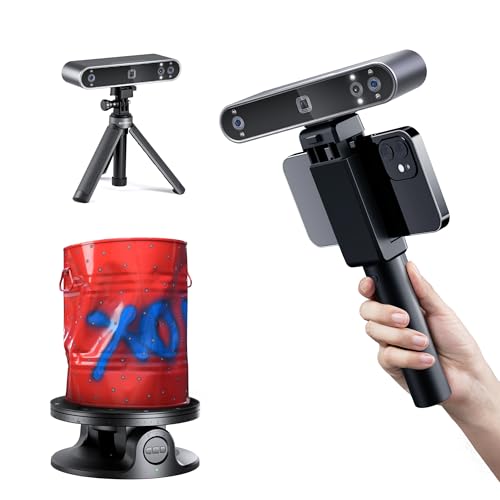
If you have ever struggled to capture the fine details of a small mechanical part or a delicate figurine for 3D printing, you know that not all 3D scanners are created equal. The Revopoint MINI 2 3D scanner promises industrial-grade precision for objects from a few millimeters up to half a meter. In this review, we evaluate its performance, key features, and whether it is the right choice for your workflow in 2026. We also compare it with other models in the Revopoint lineup to help you decide. For a broader look at affordable options, check out our best low cost 3D scanners guide.




Buying Guide
Precision and Accuracy for Small Objects
When scanning small objects, every micron matters. The Revopoint MINI 2 achieves a single-frame precision of up to 0.02 mm using industrial-grade blue light technology. This narrow wavelength filters out ambient light interference, delivering cleaner point clouds for intricate geometries. If you work with jewelry, dental models, or miniature components, this level of detail is critical. For larger objects, you might consider the Revopoint POP 4 3D scanner, which offers a wider scanning range.
Color Capture and Texture Fidelity
Full-color scans add realism to 3D models for animation, archiving, or product design. The Revopoint MINI 2 features an upgraded RGB camera with a larger aperture and six Flash LEDs. This setup improves texture capture and marker recognition on featureless surfaces. The result is more vibrant, accurate colors without extra post-processing. For outdoor scanning needs, the Revopoint Inspire 2 3D scanner handles higher ambient light levels.
Connectivity and Portability
A portable scanner should integrate seamlessly into your existing setup. The Revopoint MINI 2 offers both USB Type-C for plug-and-play desktop use and Wi-Fi 6 for wireless mobile scanning with iOS, Android, Windows, or macOS devices. Weighing only 175 grams, it is comfortable for one-handed operation. This makes it ideal for field work or quick scans on a workshop bench. For a more powerful workstation, see our creality raptor pro 3D scanner review for comparison.
Software and Workflow Integration
The included Revo Scan software handles scanning, editing, and exporting in multiple formats (PLY, OBJ, STL, ASC, 3MF, GLTF, FBX). Its intuitive interface and IMU stabilization reduce faulty frames from shaky hands. For advanced reverse engineering, you can export to Revo Design (sold separately). Beginners will appreciate the step-by-step tutorials. If you are new to scanning, our revopoint POP 2 premium review offers insights into entry-level workflows.
Final Thoughts
After evaluating the Revopoint MINI 2 3D scanner, we believe it is a standout choice for anyone who needs to capture small objects with high precision and full color. Its blue light technology, fast capture speeds, and lightweight design make it a practical tool for 3D printing, jewelry design, and quality control. For those who need even higher accuracy for industrial inspection, we recommend the Revopoint MetroX Pro 3D Scanner, Blue Laser Scan, which offers 0.01 mm precision. Alternatively, for a versatile all-in-one solution, consider the Revopoint MIRACO Plus 3D Scanner, All-in-One Scan, which includes a built-in display and photogrammetric metrology. Both options expand your scanning capabilities beyond small objects.
Frequently Asked Questions
What is the maximum object size the Revopoint MINI 2 can scan?
The Revopoint MINI 2 is designed for small objects from 10 x 10 x 10 mm up to 0.5 x 0.5 x 0.5 m. Scanning objects outside this range may lead to suboptimal tracking or incomplete data. For larger items, consider a model like the Revopoint POP 4.
Do I need scanning spray for the Revopoint MINI 2?
Due to its blue light technology, scanning results vary with material and color. We recommend using scanning spray on shiny or dark surfaces for optimal results. The scanner’s Flash LEDs help with marker recognition, but spray improves consistency on challenging objects.
Can the Revopoint MINI 2 scan people?
Yes, the Revopoint MINI 2 uses Class 1 blue light, which is eye-safe for skin scanning. However, its small scanning volume limits full-body captures. It is better suited for scanning smaller body parts like hands or ears. For full-body scanning, see our best 3D scanner for scanning people guide.
What software is compatible with the Revopoint MINI 2?
The scanner works with Revo Scan for Windows, macOS, iOS, and Android. It also supports Revo Design for scan-to-CAD workflows (sold separately). Export formats include STL, OBJ, PLY, and more, ensuring compatibility with most 3D modeling and slicer software in 2026.