Imagine you have a detailed prototype or a historical artifact you need to digitize with exacting fidelity. You want a scanner that captures every contour without a steep learning curve. This guide explores the Revopoint POP 2 Premium, a popular choice for makers, designers, and preservationists. We will walk through its features, compare it with other Revopoint models, and help you decide if it fits your workflow. For a broader look at affordable options, check out our guide on best low cost 3D scanners for makers and hobbyists.





Buying Guide
Scanning Precision and Detail
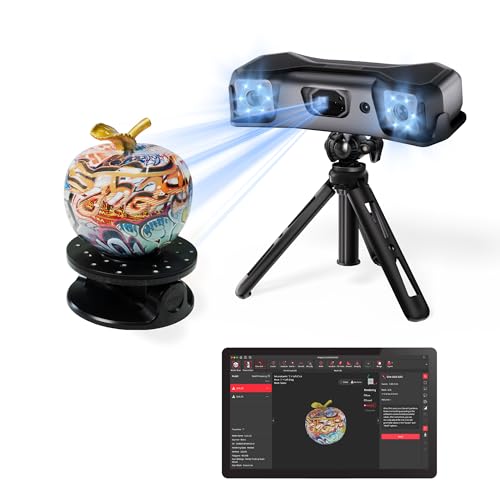
When choosing a 3D scanner, accuracy is paramount. The Revopoint POP 2 Premium boasts a single-frame precision of up to 0.04 mm, which is excellent for capturing fine details on medium-sized objects. This level of detail is crucial for reverse engineering or creating precise 3D models for printing. Models like the Revopoint MetroY Pro 3D Scanner, Blue Laser take this further with industrial-grade 0.01 mm precision, but the POP 2 Premium offers a strong balance for most users.
Color Capture and Realism
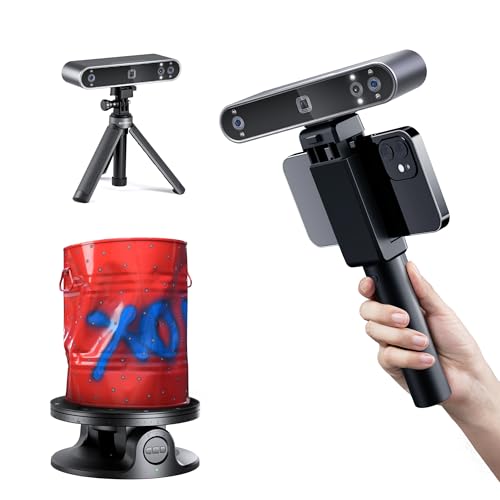
Full-color scanning adds a layer of realism to your digital models. The Revopoint POP 2 Premium includes an HD RGB camera and a Flash LED lighting system to capture vibrant, true-to-life colors. This feature is invaluable for creating digital archives of artwork or for product design presentations. If color accuracy is your top priority, the Revopoint POP3 Plus 3D Scanner, Full-Color Scan offers improved pixel mapping for even richer results.
Connectivity and Workflow
Modern scanners should integrate seamlessly into your existing setup. The Revopoint POP 2 Premium supports both Wi-Fi 6 and USB Type-C connections, making it compatible with iOS, Android, Windows, and macOS devices. This flexibility allows you to scan on the go or in a studio setting. For extended mobile scanning, consider the Revopoint Mobile Power Kit, which provides up to 125 minutes of battery life for handheld operation.
Software and Ease of Use
Intuitive software can make or break your scanning experience. The Revopoint POP 2 Premium comes with Revo Scan, a free application that guides you through scanning, editing, and exporting. Its user-friendly interface and built-in tutorials help beginners get started quickly. For advanced users, the software supports global marker tracking and exports to popular formats like STL, OBJ, and PLY, ensuring compatibility with most CAD and slicer software.
Final Thoughts
After evaluating the Revopoint POP 2 Premium, we find it a solid choice for anyone needing reliable, full-color 3D scans of medium-sized objects without a huge investment. Its combination of 0.04 mm precision, fast 18 FPS scanning, and wireless connectivity makes it versatile for both hobbyists and professionals. If you need even higher accuracy for industrial applications, the Revopoint MetroX Pro 3D Scanner, Blue Laser Scan offers 0.01 mm precision and multiple scanning modes. For those who prioritize portability and ease of use, the Revopoint POP3 Plus 3D Scanner, Full-Color Scan is a worthy upgrade with improved optical zoom. Ultimately, your choice depends on your specific needs, but the POP 2 Premium delivers a satisfying balance of performance and value.
Frequently Asked Questions
What objects can the Revopoint POP 2 Premium scan?
The Revopoint POP 2 Premium is designed for medium-sized objects ranging from 20 x 20 x 20 mm up to 2 x 2 x 2 m. It handles items like mechanical parts, sculptures, and even small body parts for 3D printing or digital archiving. For larger objects, you might need a different scanner or a turntable accessory.
Does the Revopoint POP 2 Premium require scanning spray?
No, the Revopoint POP 2 Premium uses structured light technology that works well on most surfaces without spray. However, for highly reflective or transparent objects, you may still need a light dusting of spray to improve scan quality. The scanner’s class 1 infrared light is safe for skin and eyes.
Is the Revopoint POP 2 Premium compatible with my computer?
Yes, the Revopoint POP 2 Premium works with Windows, macOS, iOS, and Android devices via Wi-Fi 6 or USB Type-C. The free Revo Scan software runs on x86_64 architecture. For the best performance, ensure your computer meets the recommended specifications, especially for handling large point cloud data.
How does the Revopoint POP 2 Premium compare to the POP 3 Plus?
The Revopoint POP 2 Premium offers 0.04 mm precision and 18 FPS scanning, while the POP 3 Plus improves accuracy by 20% and adds optical zoom for 30% more detail. The POP 3 Plus also features a 9-axis IMU for better stability. If you need the highest detail, the POP 3 Plus is a step up, but the POP 2 Premium remains a cost-effective choice. For more comparisons, see our revopoint POP 4 3D scanner review.