

You’ve just finished a stunning wood engraving project with your diode laser, but now you’re eyeing that pile of stainless steel tumblers and sterling silver rings. The problem? A standard 10W or 20W diode laser can’t touch metal without special coatings. That’s where the xTool S1 1064nm infrared laser module steps in, opening up a whole new world of engraving possibilities. In this review, we’ll explore the xTool S1 1064nm infrared laser module and the bundles that include it, helping you decide if this is the right upgrade for your workshop.
Whether you’re a jewelry maker looking to personalize pieces, a hobbyist wanting to engrave metal tumblers, or a small business owner seeking to expand your product line, this guide is for you. We’ll break down the key features of the infrared module, compare it with the powerful 40W diode options, and help you choose the perfect setup. If you’re new to laser engraving, you might also want to check our xTool S1 40W laser module review to see the difference between diode and IR technologies.



Buying Guide: What to Consider When Choosing an xTool S1 Infrared Module
1. Laser Type and Wavelength: Diode vs. Infrared
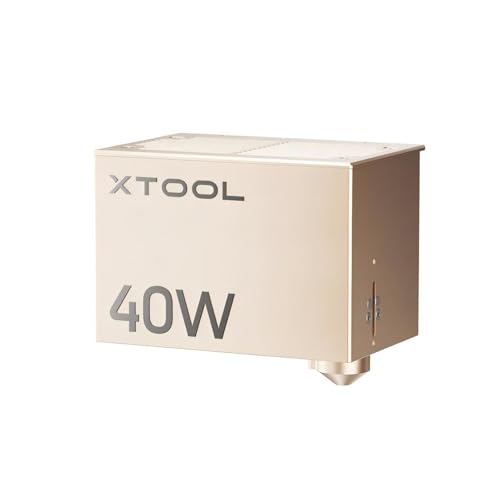
The most critical decision is the laser source. The xTool S1 1064nm infrared laser module uses a different wavelength than the standard diode lasers. This 1064nm wavelength is absorbed by metals, allowing you to engrave directly on gold, silver, platinum, copper, and even stainless steel without any coating. In contrast, the 40W diode module (like the xTool S1 40W Laser Module for xTool S1 Laser) is fantastic for wood, acrylic, and even cutting thin metal, but it won’t produce the same high-contrast marks on bare metal.
For jewelry and detailed metalwork, the infrared module’s 0.03mm laser spot delivers ultra-precision. For general crafting and cutting, the 40W diode is more powerful. Consider what materials you’ll work with most. If metal is your priority, the IR module is essential. If you’re a woodworker, the 40W might be your primary workhorse, and you can add the IR module later.
2. Power and Speed: Balancing Precision and Productivity
The 1064nm module has a 2W output, which might sound low compared to the 40W diode. However, for engraving metals, this power is sufficient because the wavelength is absorbed so efficiently. The engraving speed is still up to 600mm/s, so you can process many items quickly. The 40W diode, on the other hand, offers blazing cutting speeds through thick wood and acrylic. When choosing between the two, think about your typical projects. If you’re engraving dog tags or rings, the IR module’s speed is more than adequate. If you’re cutting 18mm wood, the 40W is your best bet.
Some bundles, like the xTool S1 40W IR Rotary Bundle, combine both modules, giving you the best of both worlds. This is ideal for those who want to engrave everything from wood to metal without compromise.
3. Safety Features: Class 1 Enclosure Matters
The xTool S1 series is known for its Class 1 safety certification. The enclosed design filters 99% of laser light, so you don’t need to wear safety goggles. This is a huge advantage for home workshops or businesses where multiple people might be around. The built-in flame sensors and emergency stop button add peace of mind. When you’re working with metals, which can reflect laser light, this safety is even more critical. The infrared module is a Class 4 laser product on its own, but when installed in the S1’s enclosure, it becomes safe for use without additional protective gear.
If safety is your top concern, look for bundles that include the safety set, like the xTool S1 40W IR Rotary Bundle. This set includes the enclosure and other safety features, ensuring you can operate the laser with confidence.
4. Rotary and Accessories: Expanding Your Capabilities
Engraving curved surfaces like tumblers, rings, and bracelets requires a rotary attachment. The RA2 Pro rotary included in some bundles allows you to engrave cylindrical objects with precision. The xTool S1 also features the patented Pin-point Positioning technology, which makes it easy to align your designs on curved surfaces. If you plan to engrave jewelry or drinkware, a rotary bundle is a smart investment. The best fiber laser for home use guide offers more insights into rotary options for different laser types.
Additionally, consider the AutoPassthrough feature, which lets you engrave long objects up to 118 inches. This is perfect for door signs or long metal strips. Bundles like the xTool S1 40W Rotary Bundle with the SafetyPro AP2 smoke purifier are great for those who want a complete setup without additional purchases.
Final Thoughts
After evaluating the xTool S1 1064nm infrared laser module and its various bundles, we’re impressed by its ability to bring professional-grade metal engraving into a desktop machine. For jewelry makers and metal artists, the xTool S1 1064nm Infrared Laser Module is a must-have addition to your S1, offering unmatched precision on precious metals. For those who want a versatile all-in-one solution, the xTool S1 40W IR Rotary Bundle combines the power of the 40W diode with the IR module, plus the rotary attachment, making it the ultimate choice for tackling both wood and metal projects. Whichever you pick, you’re investing in a reliable, safe, and high-performing laser system that will elevate your craft.
Frequently Asked Questions
Can the xTool S1 1064nm laser module engrave on all metals?
Yes, the 1064nm infrared wavelength is ideal for engraving on a wide range of metals, including gold, silver, platinum, copper, and stainless steel. It produces high-contrast, permanent marks without the need for special coatings or sprays. However, the depth of engraving might vary depending on the metal’s hardness.
Is the xTool S1 safe to use indoors with the infrared module?
Absolutely. The xTool S1 is a Class 1 laser product when the enclosure is closed, meaning it’s safe for use without safety goggles. The enclosure filters 99% of laser light and includes flame sensors and an emergency stop. This makes it safe for home workshops and even around pets and children, as long as you follow the manufacturer’s guidelines.
Do I need the rotary attachment to engrave curved items like rings?
Yes, for engraving on cylindrical or curved surfaces like rings, bracelets, and tumblers, the rotary attachment (RA2 Pro) is essential. It rotates the object while the laser engraves, ensuring even, precise results. Bundles like the xTool S1 40W IR Rotary Bundle include this attachment, saving you money and hassle.
What is the difference between the 40W diode module and the 1064nm infrared module?
The 40W diode module (with a 450nm wavelength) is powerful for cutting and engraving wood, acrylic, and other non-metal materials. The 1064nm infrared module is specifically designed for engraving metals and certain plastics with high precision. They complement each other, and many users opt for bundles that include both to cover all their project needs.
If you’re still deciding between different laser types, our xTool F2 ultra 60W MOPA review might offer additional perspective on fiber lasers.



