🔥 3D Printer Black Friday Deals: picks worth watching →
You have a workshop full of ideas, but choosing between a laser engraver and a 3D scanner can feel overwhelming. Both Creality and Revopoint offer powerful tools that expand what you can create, but they serve different purposes. This guide compares six standout products from these two brands, helping you decide which one fits your projects. Whether you are a hobbyist or a professional, we break down the key differences to save you time and money.
In the Creality vs Revopoint debate, the right choice depends on whether you need to cut and engrave materials or capture real-world objects for 3D printing. We have evaluated each product based on performance, ease of use, and versatility. For more insights on building your 3D printing setup, check out our guide to the best 3D printer kits.


What will your print cost? Use our filament cost calculator.
Buying Guide
Purpose and Workflow
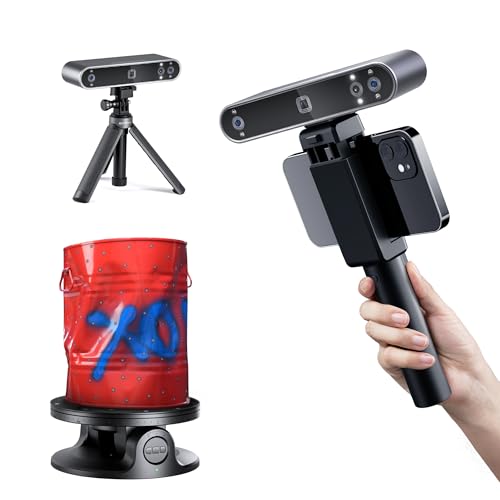
Start by defining what you want to create. Laser engravers like the Creality Falcon2 Pro 22W + 2W IR Laser Engraver excel at cutting and marking materials such as wood, acrylic, and metal. They are ideal for making signs, jewelry, and custom gifts. On the other hand, 3D scanners like the Revopoint INSPIRE 2 3D Scanner, Outdoor Scan capture physical objects and turn them into digital models for 3D printing or reverse engineering. If you already own a 3D printer, a scanner can streamline your design process.
Think about your typical projects. For engraving and cutting, a laser machine is your go-to. For digitizing objects, a scanner is essential. Consider how each tool fits into your existing workflow.
Precision and Accuracy
When comparing Creality vs Revopoint, precision is a major factor. Laser engravers achieve high detail through focused beams, with the Falcon2 Pro offering a 22W diode laser for clean cuts. 3D scanners rely on structured light or laser lines to measure surfaces. The Revopoint MINI 2 3D Scanner, Full Color Scan delivers up to 0.02 mm single-frame precision using industrial blue light, making it suitable for small, intricate objects. For larger items, the INSPIRE 2 provides 0.03 mm precision with multi-line lasers.
Evaluate the tolerance you need. For jewelry or miniatures, a scanner with sub-millimeter accuracy is critical. For woodworking, a laser’s kerf width matters more.
Material Compatibility
Laser engravers work with a wide range of materials. The Creality Falcon2 Pro S 22W Laser Engraver cuts wood up to 15 mm thick and acrylic up to 20 mm, plus it can mark stainless steel. Its interchangeable diode and IR modules expand possibilities to metals. Meanwhile, 3D scanners handle any solid object, but reflective or dark surfaces may require scanning spray. The INSPIRE 2 uses 11 infrared laser lines to capture such surfaces without spray, saving time.
If you work with metals, a laser with an IR module is a smart investment. For scanning diverse objects, look for a scanner with multi-line laser or blue light technology.
Ease of Use and Portability
Both brands prioritize user-friendly design. The Creality filament dryer, the Creality 2026 New Upgrade Filament Dryer Box Pro, requires no assembly and features a simple knob interface. Laser engravers often come with software like Falcon Design Space for easy design setup. Revopoint scanners, such as the INSPIRE 2, support wireless scanning via Wi-Fi 6 and mobile apps, making them portable. The Revopoint Electric Large Turntable for 3D simplifies scanning large objects by automating rotation.
Consider your workspace. If you need to move equipment around, lightweight options like the 190 g INSPIRE 2 are convenient. For stationary setups, an enclosed laser like the Falcon2 Pro offers safety features. For more on flexible printing materials, see our guide to the best 3D printer for TPU.
Final Thoughts
After reviewing these products, the choice between Creality and Revopoint comes down to your primary goal. If you want to cut and engrave a variety of materials with precision, the Creality Falcon2 Pro 22W + 2W IR Laser Engraver offers unmatched versatility with its dual laser modules and smart camera positioning. For capturing real-world objects for 3D printing or design, the Revopoint INSPIRE 2 3D Scanner, Outdoor Scan delivers high accuracy and wireless convenience, making it a fantastic companion for any maker’s toolkit.
Frequently Asked Questions
Can a laser engraver replace a 3D scanner? No, they serve different purposes. A laser engraver cuts and marks materials, while a 3D scanner digitizes physical objects. For a complete workflow, many makers use both.
Which brand is better for beginners in 2026? Both Creality and Revopoint offer user-friendly options. Creality’s laser engravers come with intuitive software like Falcon Design Space, while Revopoint scanners feature mobile apps and wireless connectivity. For a starting point, consider the comparison of Flashforge Adventurer 5M vs Bambu Lab A1 for 3D printers.
Do I need scanning spray for Revopoint scanners? It depends on the model. The INSPIRE 2 can scan reflective and dark surfaces without spray thanks to its infrared lasers, but the MINI 2 may require spray for best results with certain materials.
How do I maintain filament quality for 3D printing? Use a filament dryer like the Creality Space PI SE to remove moisture from hygroscopic materials. This prevents issues like stringing and clogging. For more tips, see our comparison of Elegoo vs Overture filaments.