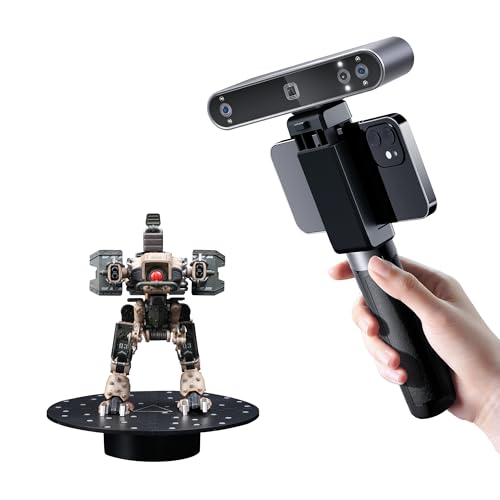
You are a maker or hobbyist who wants to digitize real-world objects for 3D printing, reverse engineering, or creative projects. But scanning reflective or dark surfaces often means messy sprays, and outdoor lighting can ruin your capture. The Revopoint INSPIRE 2 3D scanner promises to solve these pain points with wireless operation, dual scanning modules, and outdoor capability up to 20,000 lux. In this review, we break down its performance, key features, and how it stacks up against other Revopoint models to help you decide if it’s your next tool.
We’ve spent hands-on time with the INSPIRE 2, evaluating its accuracy, ease of use, and versatility. Whether you’re a hobbyist or a professional, this guide covers everything you need to know, including where it fits in the broader Revopoint lineup. For more context on portable scanning, check our revopoint POP 2 premium review to see how older models compare.



Buying Guide: What to Look for in a 3D Scanner
Accuracy and Precision
Accuracy determines how faithfully your digital model matches the real object. For 3D printing and reverse engineering, you want a scanner that offers high single-frame accuracy and volumetric accuracy. The INSPIRE 2 delivers up to 0.05 mm accuracy and 0.03 mm precision, which is excellent for small to medium objects.
But remember, accuracy can be affected by lighting and surface texture. If you need industrial-grade precision, consider models like the Revopoint MetroX Pro, which offers 0.01 mm precision. For most hobbyist projects, the INSPIRE 2’s accuracy is more than sufficient.
Scanning Modes and Versatility
Different objects require different scanning approaches. The INSPIRE 2 features dual scanning modules: infrared structured light for general use and multi-line laser for capturing dark or reflective surfaces without spray. This flexibility is a game-changer for scanning tricky materials.
If you need even more modes, the Revopoint POP 4 offers five scanning modes, including VCSEL for outdoor use. But for most users, the INSPIRE 2’s two modes cover the essentials. For a deeper look at multi-mode scanning, see our revopoint POP 4 3D scanner review.
Portability and Connectivity
If you plan to scan on the go, weight and wireless connectivity matter. The INSPIRE 2 weighs just 190g and features built-in Wi-Fi 6, allowing you to scan wirelessly with your phone or stream to a PC in real time. This makes it incredibly convenient for fieldwork or scanning large objects where you need to move freely.
For longer outdoor sessions, consider the Revopoint POP 4 Premium, which includes a 5500mAh battery grip for up to 4 hours of use. The INSPIRE 2 relies on your device’s battery, but its lightweight design makes it easy to handle for extended periods.
Final Thoughts
After evaluating the Revopoint INSPIRE 2 3D scanner, we’re impressed by its balance of portability, accuracy, and ease of use. It’s an excellent choice for hobbyists and professionals who need a reliable scanner for small to medium objects, especially those with challenging surfaces. For those who require industrial-grade precision and more scanning modes, the Revopoint MetroX Pro 3D Scanner, Blue Laser Scan is a powerhouse. But if you want a lightweight, wireless scanner that handles outdoor conditions and delivers solid results, the Revopoint INSPIRE 2 3D Scanner, Outdoor Scan is our top recommendation.
Frequently Asked Questions
Can the Revopoint INSPIRE 2 scan dark or reflective objects without spray?
Yes, the INSPIRE 2 features 11 infrared laser lines that can capture details on reflective or dark surfaces without the need for scanning spray. This saves time and keeps your objects clean.
Is the Revopoint INSPIRE 2 suitable for outdoor scanning?
Absolutely. The INSPIRE 2 can handle lighting conditions up to 20,000 lux, making it reliable in shaded or semi-bright outdoor environments. For full sunlight, you might need to use a different model like the POP 4 with an outdoor filter.
What software is compatible with the Revopoint INSPIRE 2?
The INSPIRE 2 works with Revo Scan and Revo Metro software, which are user-friendly and available for Windows, macOS, iOS, and Android. You can also import scans into Revo Design (sold separately) for a complete scan-to-CAD workflow.
How does the INSPIRE 2 compare to the POP 4 in terms of scanning speed?
The POP 4 offers faster scanning speeds up to 105 fps with NVIDIA GPU acceleration, while the INSPIRE 2 is more modest. If you need to capture large objects quickly, the POP 4 might be a better fit. For most small to medium projects, the INSPIRE 2’s speed is adequate. For a detailed comparison, check our Best Low Cost 3D Scanners for Makers and Hobbyists in 2026.