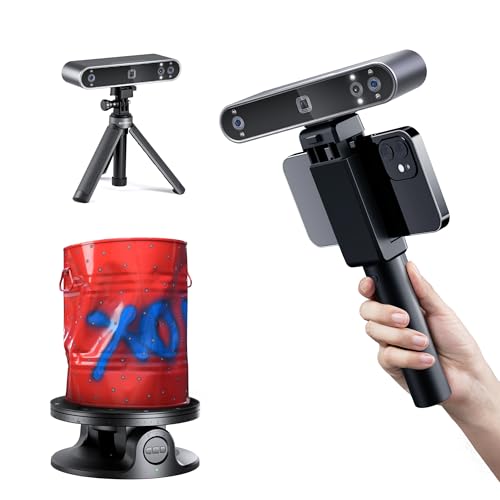
If you’re a 3D printing enthusiast or a professional designer, you know the struggle of capturing detailed, true-to-life color scans without breaking the bank. The Revopoint POP3 Plus 3D scanner review we’ve prepared dives deep into a device that promises to simplify this process. This guide is tailored for hobbyists, educators, and small business owners who want a reliable, user-friendly scanner for medium-sized objects, from figurines to mechanical parts.
We’ve spent time evaluating the POP3 Plus alongside other top Revopoint models to help you decide if it’s the right fit for your workflow. For a broader look at Revopoint’s lineup, check out our Revopoint POP 4 review to see how the newer model compares.


Buying Guide: Choosing the Right Revopoint 3D Scanner
When shopping for a 3D scanner, especially within the Revopoint ecosystem, you need to consider several key factors. The right choice depends on your typical scan subjects, your required precision, and your budget.
Precision and Accuracy
Precision is the cornerstone of any 3D scanner. The POP3 Plus offers a single-frame accuracy of 0.04mm, which is excellent for capturing fine details on medium-sized objects. If you need even higher precision for small items, the Revopoint MINI 2 might be a better fit, offering 0.02mm precision.
However, for most 3D printing and creative projects, 0.04mm is more than sufficient. It ensures your scans are dimensionally accurate and ready for post-processing.
Scanning Speed and Stability
Speed matters, especially if you scan frequently. The POP3 Plus captures up to 18 frames per second, which is decent for handheld scanning. The built-in 9-axis IMU helps stabilize the scan, reducing the number of faulty frames caused by hand movement. This feature is a lifesaver when you’re scanning complex shapes or moving around an object.
For faster scanning, consider the Creality Raptor Pro Wireless, which offers higher frame rates, but it comes at a higher cost. For a balance of speed and affordability, the POP3 Plus is a solid choice.
Color Capture and Texture
If you need full-color scans, the POP3 Plus shines with its HD RGB camera and Flash LED lighting system. It captures lifelike textures that are perfect for animation, game design, or preserving historical artifacts. The advanced pixel mapping ensures colors are vibrant and accurate.
Other scanners like the Revopoint Inspire 2 also offer color scanning, but the POP3 Plus’s balance of color quality and price makes it a standout for medium objects.
Software and Workflow Integration
Your scanner is only as good as its software. The POP3 Plus works with Revo Scan, which is free and user-friendly. It offers intuitive controls, tutorials, and regular updates. The software supports a wide range of export formats, including PLY, OBJ, STL, and more, ensuring compatibility with your favorite CAD or slicing tools.
For those on a tight budget, the best low-cost 3D scanners guide highlights alternatives, but Revopoint’s software ecosystem is a significant advantage.
Final Thoughts
After thorough evaluation, the Revopoint POP3 Plus 3D Scanner, Full-Color Scan stands out as the best all-around choice for makers and hobbyists who need reliable full-color scans of medium-sized objects without a steep learning curve. For professionals requiring industrial-grade precision and the ability to scan large or complex parts, the Revopoint MetroY Ultra 3D Scanner, Up to 90 FPS is a powerful upgrade that justifies its higher price with advanced features and metrology-grade accuracy.
Frequently Asked Questions
What is the scan volume of the Revopoint POP3 Plus?
The POP3 Plus can scan objects ranging from 20 x 20 x 20 mm up to 2 x 2 x 2 meters. This makes it versatile for small parts and larger items like furniture or even a person.
Does the POP3 Plus work with macOS and iOS devices?
Yes, the POP3 Plus connects via Wi-Fi 6 or USB Type-C to iOS, Android, Windows, and macOS devices. This cross-platform compatibility ensures you can use it with your preferred hardware.
Can I scan shiny or dark objects without spray?
The POP3 Plus uses infrared light, which struggles with highly reflective or dark surfaces. For such objects, you may need to apply a light coating of scanning spray to improve tracking. The MetroX Pro or MetroY Ultra handle these surfaces better thanks to their blue laser technology.
What file formats does the POP3 Plus export?
You can export scans in PLY, OBJ, STL, ASC, 3MF, GLTF, and FBX formats. This wide range ensures compatibility with most 3D printing, CAD, and animation software.
For more insights on Revopoint scanners, see our POP 4 review.