🔥 3D Printer Black Friday Deals: picks worth watching →
You’re knee-deep in a reverse engineering project, and the part you need to replicate has intricate holes and shiny surfaces. Your current scanner struggles with the glare, forcing you to apply spray and wait. The Revopoint MetroY Pro 3D Scanner promises to change that with its blue laser technology that handles dark and glossy objects without any prep. In this review, we’ll dive into what makes the MetroY Pro a standout in the 3D scanning world, its key features, and how it compares to other models in the Revopoint lineup.
Whether you’re a professional engineer, a product designer, or a serious maker, this guide will help you decide if the MetroY Pro is the right tool for your workflow. We’ll cover its accuracy, scanning modes, software, and more, so you can make an informed choice. If you’re also curious about the more portable options, check out our Revopoint POP 4 review for a comparison.


Buying Guide: What to Look for in a 3D Scanner
Accuracy and Precision
When you’re scanning parts for industrial applications, accuracy is non-negotiable. Look for specifications like single-frame precision and volumetric accuracy. The MetroY Pro offers a precision of up to 0.01 mm and volumetric accuracy of 0.02 mm + 0.04 mm/m, which is exceptional for capturing fine details.
High accuracy ensures that your 3D prints or CAD models match the original part dimensions exactly. For less demanding tasks, entry-level scanners like the Revopoint MINI 2 may suffice, but for professional use, the MetroY Pro’s precision is a game-changer.
Scanning Modes and Versatility
Different objects require different scanning approaches. The MetroY Pro’s five modes, including 34 cross-lines for large surfaces and 15 parallel lines for fine details, offer flexibility that is rare in this price range. The single-line mode is perfect for deep holes, while the 62-line structured light mode enables marker-free scanning of feature-rich objects.
This versatility means you can scan everything from small mechanical parts to larger components without switching devices. If you need a scanner for varied projects, this adaptability is crucial. For a more budget-friendly option, the Revopoint Inspire 2 offers fewer modes but is still capable for hobbyists.
Ease of Use and Software
No one wants a scanner that requires a PhD to operate. The MetroY Pro comes with Revo Metro software, which simplifies scanning, meshing, and editing. Its one-click export to Revo Measure or Revo Design streamlines your workflow, and the software integrates with popular platforms like Quicksurface and Geomagic Control.
Real-time temperature monitoring and automatic fan speed adjustment prevent accuracy drift, so you can focus on scanning, not troubleshooting. If you’re looking for a scanner with a more intuitive interface, the Creality Raptor Pro Wireless is worth considering, but the MetroY Pro’s professional software suite is a strong selling point.
Connectivity and Portability
Wi-Fi 6 connectivity allows wireless scanning, freeing you from cables and enabling real-time streaming to your phone or tablet. This is particularly useful for scanning large objects where you need to move around freely. The MetroY Pro also supports PC-to-mobile streaming via the Revo Mirror app, making it easy to monitor scans from a distance.
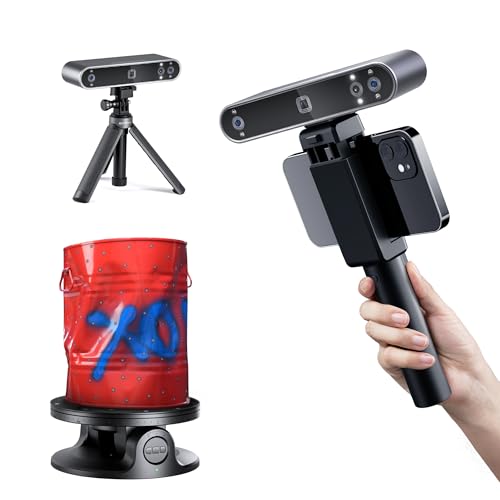
Portability is another factor; the MetroY Pro is compact and can be used with the optional Mobile Power Kit for handheld scanning. If you often scan in the field, this flexibility is invaluable. For a more portable option, check out our guide on best low cost 3D scanners.
Final Thoughts
After evaluating the Revopoint MetroY Pro 3D Scanner, it’s clear that this device is a powerhouse for professionals who demand accuracy and versatility. Its five scanning modes, no-spray capability, and real-time streaming make it a top choice for reverse engineering and quality inspection. For those who need even higher precision with photogrammetric metrology, the Revopoint MIRACO Plus 3D Scanner, All-in-One Scan is an excellent alternative. But if you’re focused on industrial modeling and measurement, the Revopoint MetroY Pro 3D Scanner, Blue Laser delivers exceptional value and performance.
Frequently Asked Questions
Can the Revopoint MetroY Pro scan shiny or dark objects without spray?
Yes, the MetroY Pro’s blue laser modes can capture shiny and dark surfaces without any scanning spray. This saves time and protects delicate parts from residue.
What is the maximum scanning speed of the MetroY Pro?
The MetroY Pro can scan at up to 2,000,000 points per second in laser modes, and up to 7 million points per second in the 62-line full-field structured light mode. This makes it one of the fastest scanners in its class.
Does the MetroY Pro work with macOS and Windows?
Yes, the MetroY Pro is compatible with both Windows and macOS. However, some paid software like Revo Measure and Revo Design are Windows-only, so check compatibility if you rely on those tools.
How does the MetroY Pro compare to the MetroX Pro?
The MetroY Pro offers five scanning modes, while the MetroX Pro has four. The MetroY Pro also features a single-line mode for deep holes and a higher resolution in some modes. For more details, see our full review.