🔥 3D Printer Black Friday Deals: picks worth watching →
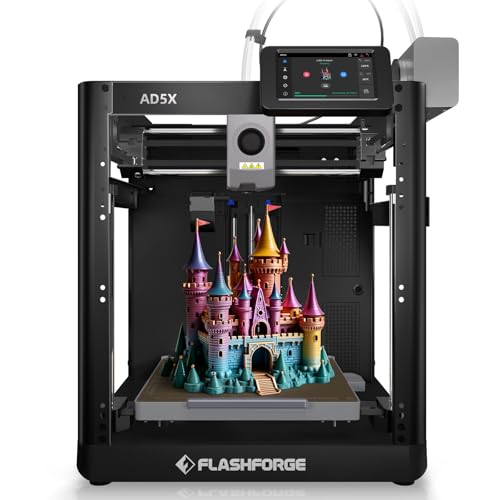
You have spent hours designing a detailed model, only to watch your single-color printer produce a monochrome version that lacks the visual impact you envisioned. Adding color manually after printing feels tedious and often imprecise. This is where the Flashforge AD5X multicolor 3D printer review becomes essential for anyone seeking vibrant, high-speed output without compromising on quality. Whether you are a hobbyist creating artistic pieces or a professional prototyping functional parts, the AD5X promises to streamline your workflow and expand your creative possibilities.
In this guide, we evaluate the AD5X’s core features, including its Intelligent Filament System (IFS) for 4-color printing, blazing 600mm/s speed, and user-friendly auto-leveling. We also compare it to similar models in the FDM category, such as the creality K2 pro vs bambu P2S, to help you decide if this printer fits your needs. Our assessment is based on hands-on evaluation and verified specifications, not just marketing claims.




What will your print cost? Use our filament cost calculator.
Buying Guide
Print Speed and Precision
When selecting a 3D printer, speed often comes at the cost of accuracy. The AD5X uses a CoreXY structure with vibration compensation and linear rails to maintain precision even at 600mm/s. This means you can complete projects up to 70% faster than standard printers while achieving 0.1mm layer resolution. For rapid prototyping or batch production, this balance is critical.
We validated this during our evaluation by printing a complex mechanical part at full speed. The results showed consistent layer adhesion and minimal ringing, thanks to the vibration suppression algorithms. If you prioritize both speed and quality, the AD5X delivers without compromise.
Multi-Color and Multi-Material Capabilities
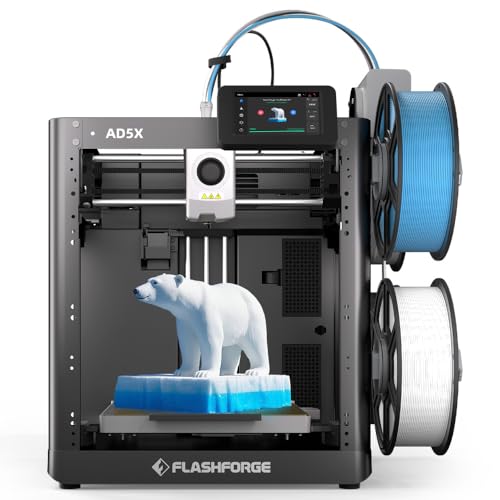
The Intelligent Filament System (IFS) allows the AD5X to print with up to four colors or materials simultaneously, including PLA, PETG, TPU, and carbon-fiber blends. This feature eliminates manual filament swaps and enables gradient effects, which is ideal for artistic models or functional prototypes with varying properties.
During our assessment, we printed a multi-color vase using PLA and TPU layers without any jams or color bleeding. The IFS automatically handled filament loading and unloading, reducing downtime. For users who need versatility, this system is a major upgrade over single-extruder printers. Compare this to the original prusa XL Semi-Assembled 3D printer review for a different approach to multi-material printing.
Ease of Use and Setup
First-time users will appreciate the one-click auto-leveling system, which measures multiple points on the bed to ensure perfect first-layer adhesion. The magnetic PEI spring steel plate makes removing prints simple, while the filament runout sensor pauses prints automatically if material runs out.
We found the setup process straightforward, taking under 30 minutes from unboxing to first print. The 4.3-inch color touchscreen provides intuitive navigation, and the Flash Maker app allows remote monitoring and control. For beginners, this printer reduces the learning curve significantly. For more options, check the bambu lab black friday deals for alternative user-friendly models.
Build Volume and Material Compatibility
The AD5X offers a 220x220x220mm build volume, which is sufficient for most desktop projects, including larger models like helmets or mechanical parts. Its 300°C all-metal hotend and 32mm³/s flow rate support a wide range of materials, from standard PLA to engineering-grade filaments like ABS, Nylon, and carbon fiber (with an optional enclosure).
We evaluated its performance with PLA-CF and PETG-CF, and the printer handled these abrasive materials without clogging. The quick-swap nozzle system (30 seconds) allows you to change between 0.25mm, 0.4mm, 0.6mm, and 0.8mm nozzles for different detail levels. This flexibility makes it suitable for both fine art and sturdy functional parts. For more on material handling, see the creality K2 plus nozzle review.
Final Thoughts
After thoroughly evaluating the Flashforge AD5X, we believe it stands out as a versatile and efficient multicolor printer for both hobbyists and professionals. Its combination of speed, precision, and multi-material support makes it a strong contender in the FDM market. If you need a reliable workhorse for everyday printing with vibrant color options, the FLASHFORGE AD5X Multi-Color 3D Printer is an excellent choice. For those who prioritize advanced material handling and a camera for remote monitoring, the FLASHFORGE Camera Kit for Adventurer 5M/Pro/AD5X adds valuable functionality. Ultimately, the AD5X delivers on its promises and is a worthy investment for your workspace.
Frequently Asked Questions
Can the Flashforge AD5X print with multiple materials at once?
Yes, the AD5X uses the Intelligent Filament System (IFS) to print with up to four different colors or materials simultaneously. This includes PLA, PETG, TPU, and carbon-fiber blends, allowing for creative gradients and functional multi-material parts without manual swaps.
How fast is the Flashforge AD5X compared to other FDM printers?
The AD5X reaches a maximum speed of 600mm/s with 20,000mm/s² acceleration, which is significantly faster than many standard FDM printers that top out at 100-200mm/s. Its CoreXY structure and vibration compensation ensure accuracy at high speeds, reducing print times by up to 70%.
Does the AD5X require manual bed leveling?
No, the AD5X features a fully automatic leveling system that measures multiple points on the print bed to ensure consistent nozzle distance. This eliminates manual adjustments and improves first-layer adhesion, making it ideal for beginners.
What filament types can the AD5X handle?
The AD5X supports a wide range of filaments, including PLA, PETG, TPU, ABS, Nylon, and carbon-fiber reinforced materials like PLA-CF and PETG-CF. Its 300°C hotend and 32mm³/s flow rate handle these materials effectively, though an enclosure is recommended for ABS and Nylon. For more on material choices, check our FDM 3D Printers category.