

You’ve finally decided to dive into multi-color 3D printing, but the thought of complex setups and constant calibration is holding you back. The Creality K2 SE 4C review you’re about to read covers a printer that promises to change that. We’ll break down its features, performance, and whether it’s the right fit for your creative projects in 2026.
This guide is for hobbyists, educators, and makers who want vibrant, multi-material prints without the usual headaches. We’ll explore the printer itself, plus essential accessories like an enclosure and a replacement hotend, to give you a complete picture of the Creality K2 SE ecosystem.



Buying Guide: What to Consider Before Choosing a Multi-Color 3D Printer
Investing in a multi-color 3D printer is a big step, and you want to get it right. We’ve evaluated several key factors that separate a great machine from a frustrating one. Here’s what we recommend you focus on.
Print Speed and Acceleration
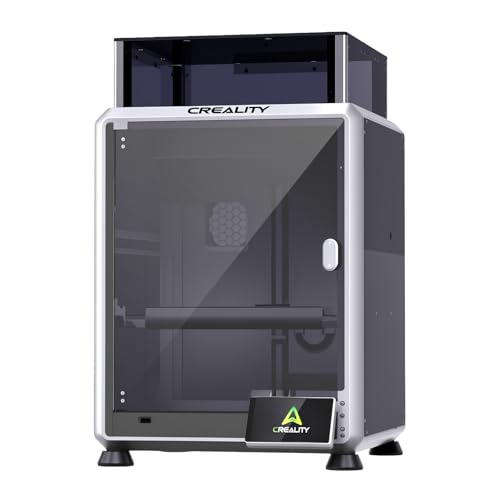
Speed is a game-changer, especially when you’re printing multiple color swaps. The Creality K2 SE 4C 3D Printer boasts a CoreXY motion system that hits up to 500mm/s with 20,000mm/s² acceleration. That means you can finish projects in hours, not days.
We’ve seen how this speed doesn’t sacrifice quality, thanks to a rigid all-metal frame that minimizes vibration. If you’re upgrading from a slower printer, the difference is night and day. For more on balancing speed and quality, check our expert picks for quality and speed.
Ease of Setup and Leveling
No one wants to spend hours manually leveling a bed. The K2 SE 4C comes with intelligent auto bed leveling that probes only the active print area. This ensures perfect first layers every time, reducing failed prints and wasted filament.
It’s a feature that both beginners and pros will appreciate. If you’re new to 3D printing, you might also want to look at our top picks for beginners on a budget to see how this printer stacks up.
Multi-Color Capabilities and Filament Handling
Multi-color printing is the main event, and the K2 SE 4C handles it beautifully. It uses a 4-color system that doesn’t require extra modules or complicated upgrades. The compact design takes up less space than traditional multicolor systems, making it ideal for home offices.
Smart features like filament runout sensor, tangle detection, and power loss recovery protect your long prints. For a broader look at the best multi-color options, see our guide to multi-color printers for home.
Compatibility with Advanced Materials
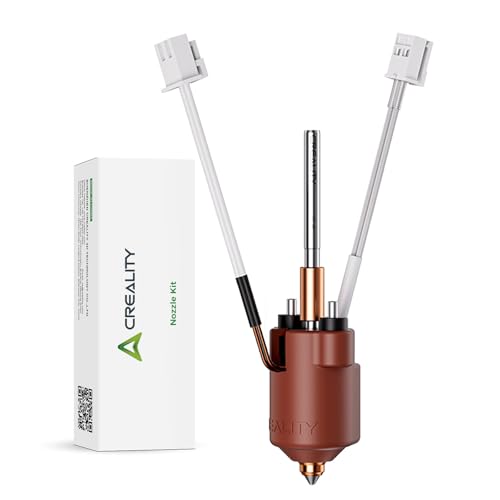
If you plan to print with carbon fiber or nylon, you need a hotend that can handle high temperatures. The Creality Official K2 SE Ceramic Heating Block Kit supports up to 300°C and features an all-metal integrated design. It’s a worthy upgrade for those who want to experiment with advanced filaments.
We’ve seen how the titanium alloy heat break and hardened steel nozzle extend the printer’s versatility. For more on carbon fiber printing, check out our top picks for carbon fiber.
Final Thoughts
After thoroughly reviewing the Creality K2 SE 4C 3D Printer, it’s clear this is a standout choice for anyone ready to embrace multi-color printing without the usual complexity. Its speed, smart features, and beginner-friendly design make it a top pick for most creators. If you’re looking to enhance your setup, the Creality Official K1 SE/ K2 SE Enclosure is a perfect companion, providing constant temperature and noise reduction for even better results.
Frequently Asked Questions
Can the Creality K2 SE 4C print with multiple colors without manual filament changes?
Yes, the K2 SE 4C is designed for effortless multicolor printing right out of the box. It uses a 4-color system that automatically switches filaments during the print, so you don’t need to manually swap spools.
How fast can the Creality K2 SE 4C print?
The K2 SE 4C can reach speeds up to 500mm/s with an acceleration of 20,000mm/s². This makes it one of the fastest printers in its class, significantly reducing print times for complex models.
Is the Creality K2 SE 4C suitable for beginners?
Absolutely. It comes with auto bed leveling, a ready-to-print setup, and smart protection features like filament runout detection. Beginners can start printing within minutes, while advanced users can explore root access and Fluidd UI for more control.
What materials can the Creality K2 SE 4C print?
The printer is compatible with PLA, PETG, and dual-material breakaway supports. With the upgraded ceramic heating block, you can also print ABS, TPU, PP, PC, and carbon fiber composites like PLA-CF and PA-CF. For more on material options, check our guide on Creality Ender 3 V3 SE as a comparison.






