🔥 3D Printer Black Friday Deals: picks worth watching →
You are ready to upgrade your FDM 3D printer, and the choice comes down to two heavyweights: the Creality K2 Pro and the Bambu Lab P2S. Both promise high-speed, multicolor printing, but they target different user needs. This guide compares the Creality K2 Pro vs Bambu P2S, focusing on build volume, material handling, and smart features to help you select the right machine for your projects in 2026. Whether you are a hobbyist or a professional, understanding these differences is key to a satisfying purchase.
We have evaluated both printers across several real-world criteria, from setup ease to print quality. For more insights on the Creality lineup, check our creality K2 plus nozzle review for upgrade tips.


What will your print cost? Use our filament cost calculator.
Buying Guide
Build Volume and Size
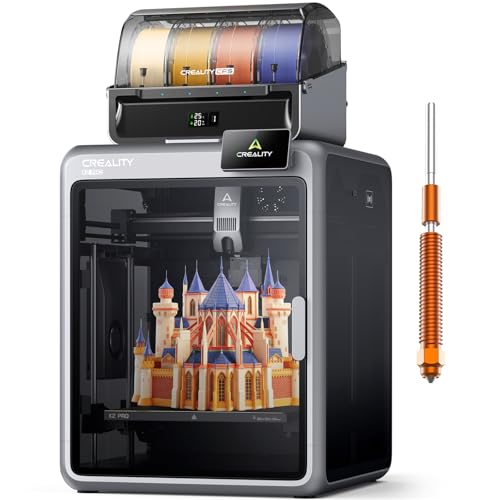
Your project size dictates the needed build volume. The Creality K2 Pro offers a generous 300x300x300 mm space, while the standard Creality K2 provides 260x260x260 mm. The Bambu Lab P2S has a smaller footprint, focusing on speed and precision. For large helmets or batch printing, the K2 Pro is ideal. For desktop models, the P2S works well. If you need even more room, the Original Prusa XL 2-Toolhead offers a different approach.
Multicolor Printing Capabilities
Both lines support multicolor printing via external filament systems. Creality’s CFS (Creality Filament System) can link up to four units for 16 colors, with RFID detection and drying. The Bambu Lab AMS 2 Pro also enables seamless multicolor prints and includes active drying up to 65°C. The Creality K2 Pro Combo comes with one CFS unit, while the Bambu P2S Combo includes the AMS 2 Pro. Your choice depends on ecosystem preference and filament management needs.
Print Speed and Precision
Both printers boast speeds up to 600 mm/s with accelerations over 20,000 mm/s². The Creality K2 Pro uses step-servo motors with FOC for quiet, precise motion. The Bambu P2S relies on a PMSM servo extruder with active flow compensation. In our assessment, the K2 Pro offers slightly better stability for large prints, while the P2S excels in fine details. For a speed-focused alternative, read our Flashforge AD5X review.
Material Versatility
The Creality K2 Pro supports a wide range of materials, including PLA, PETG, ABS, and engineering filaments like PPA-CF, with a 300°C hardened steel nozzle and a 60°C heated chamber. The Bambu P2S offers a 50°C chamber and a carbon filter for safe printing of engineering materials. If you plan to print advanced composites, the K2 Pro’s higher temperature range and stronger frame give it an edge.
Final Thoughts
In the battle of Creality K2 Pro vs Bambu P2S, your decision hinges on your specific needs. For professionals requiring a large build volume and robust material handling, the Creality K2 Pro Combo (A) 3D Printer is the clear winner. For hobbyists who value speed, precision, and a streamlined ecosystem, the Bambu Lab P2S Combo, P2S 3D Printer & AMS 2 Pro offers exceptional value. Both machines represent the best of 2026 FDM technology, so choose the one that aligns with your creative ambitions.
Frequently Asked Questions
Can the Creality K2 Pro print with 16 colors? Yes, by linking four CFS units together, the K2 Pro can print in up to 16 colors, making it ideal for complex multicolor projects.
Does the Bambu Lab P2S require assembly? The P2S is designed for quick setup, taking about 15 minutes to unbox and start printing, thanks to automatic calibration and a pre-assembled frame.
Which printer is quieter, the K2 Pro or the P2S? Both printers feature silent operation modes. The Creality K2 Pro uses step-servo motors and balanced fans, while the Bambu P2S employs adaptive airflow, making both suitable for home offices.
What materials can the Creality K2 Pro handle? It supports PLA, PETG, ABS, PLA-CF, PET, and engineering filaments up to 300°C, with a heated chamber for warping-prone materials. For more on nozzle upgrades, see our creality K2 plus nozzle review.